
The Redmine HRM Plugin plans your resources consistently from the user’s point of view: You see at a glance who is really available and where bottlenecks occur, across all projects and realistically. In this post you will learn why this approach works so well and how it helps you make better planning decisions.
A typical problem: employees work in several projects
Imagine this: Your team member Susi is active in three projects at the same time. In project A she has 20 hours planned, in project B 15 hours, and in project C another 10 hours, all for the coming week. If you only looked at the resource planning for project A, you would think Susi still has plenty of capacity.
That is wrong, because in reality she is already fully booked.
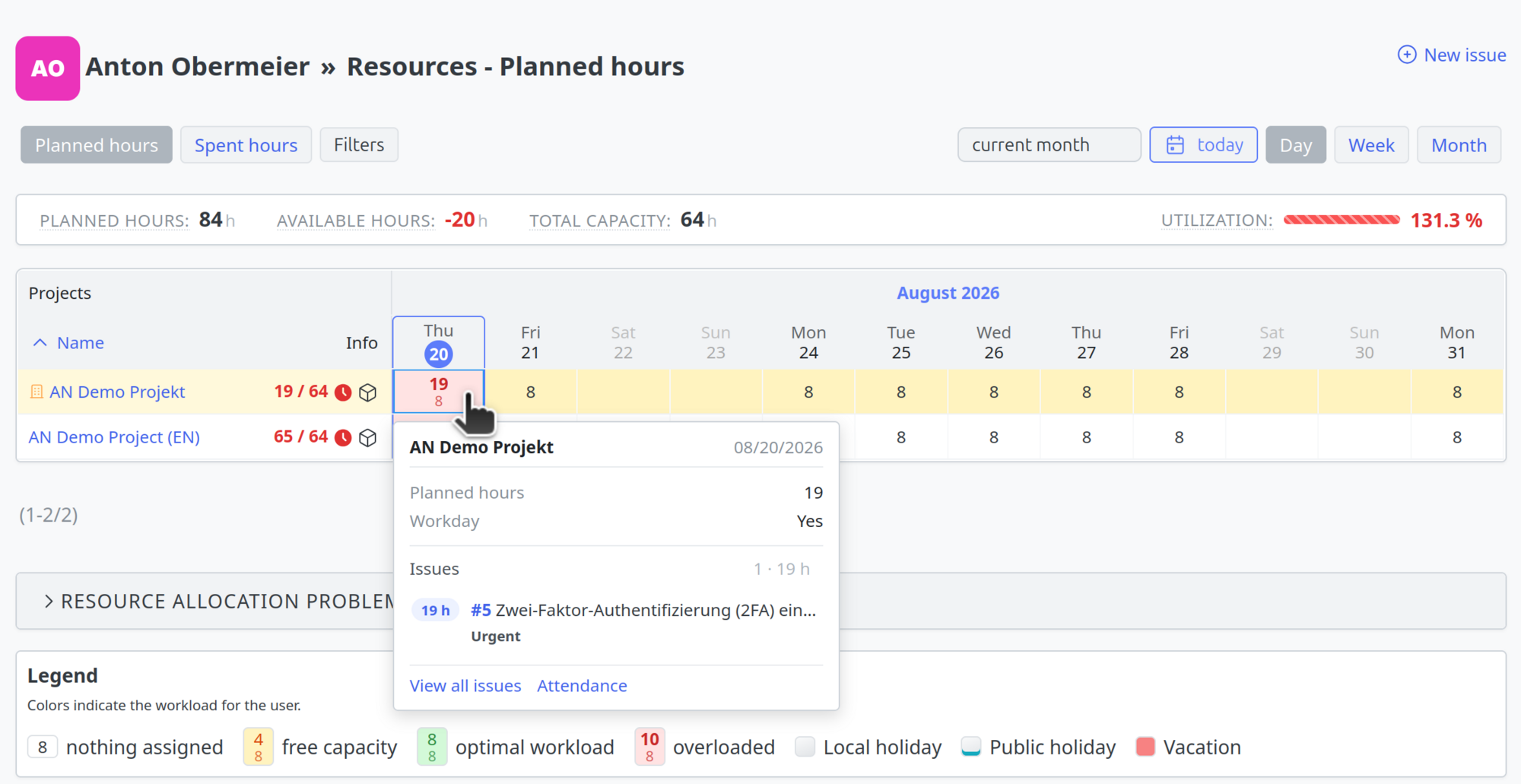
This is exactly why the resource planning in the Redmine HRM Plugin works user-based and across projects.
How a realistic resource calculation works
The HRM Plugin automatically calculates the workload of an employee across all issues assigned to them in all open projects. The following factors flow into the calculation:
- All issues assigned to a user (not to groups!)
- Estimated time (no estimate means no planning)
- Spent time from all projects
- Working time calendar (working hours, velocity, holidays)
- Absences (vacation, sick leave, home office)
- Priorities and due dates (for the distribution over time)
What does this mean in practice?
If Susi logs 3 hours in project B today, you see this immediately in the resource view of project A, and rightly so. These 3 hours are missing for her other tasks. The resource planning shows you the actual availability of your team.
Three views for different perspectives
Even though the calculation covers all projects, the HRM Plugin offers you three different resource views:
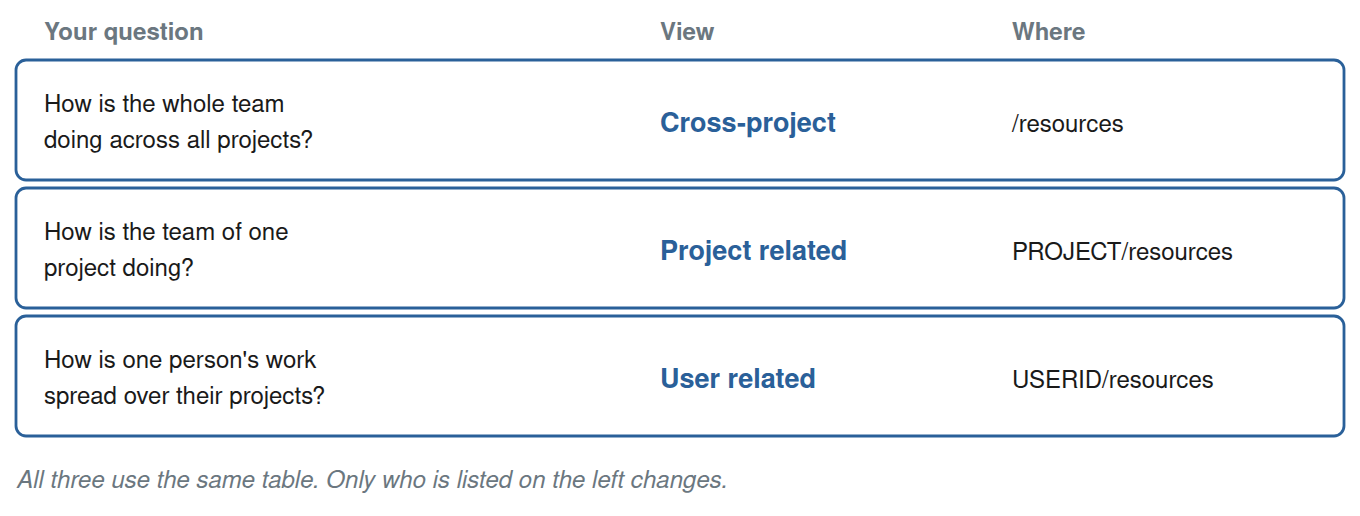
1. Cross-project view
The view from above: all employees, all projects. Ideal for management and resource managers who need the complete overview.
Access: Top menu → Resources or /resources
2. Project view
The team focus: shows only the employees who work in this specific project. But note: their workload still takes their work in other projects into account!
Access: Inside a project → “Resources” tab
3. User view
The personal perspective: a single employee sees their workload across all of their projects.
Access: User profile → “Resources” tab
Only if an employee works exclusively for one project and is assigned only to that project would this view show their complete resources. Otherwise it does not.
Why is there no restriction to a single project?
The resource planning is based on an automated set of rules that was deliberately designed this way.
The problem with isolated project views:
- You would see unrealistic availability
- Overbooking would not be detected
- Conflicts between projects would remain invisible
- The actual workload would not be visible
The advantage of a user-based forecast:
- You see the real capacity of your employees
- Bottlenecks become visible immediately
- You can detect delays early
- The planning is realistic instead of optimistic
What you can do instead
Even though you cannot restrict the resource planning to individual projects, there are practical approaches.
1. Use the project resource view
Even though spent time from all projects flows in, you can look at your team specifically within a project. You see immediately who is fully booked, no matter where the workload comes from.
2. Close projects deliberately
Closed and archived projects are not included in the resource calculation. Mark projects that are on hold or finished accordingly instead of leaving them open.
3. Work with issue statuses
You can exclude certain issue statuses from the resource planning (for example “Backlog” or “Waiting”). This helps you see only actively worked issues in the planning.
Setting: Administration → Plugins → Redmine HRM → Resources → Excluded issue status
4. Use the problem list
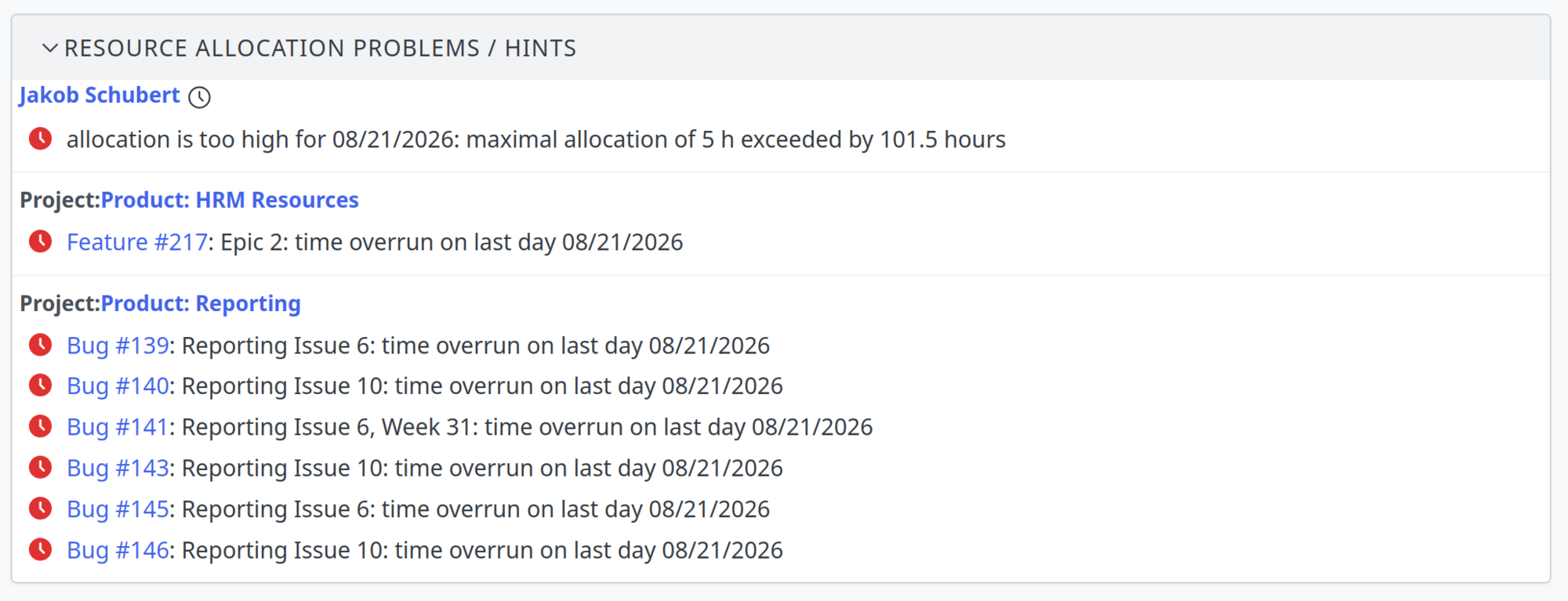
At the end of the “Planned hours” view, the HRM Plugin automatically shows you problems in the resource allocation:
- Time overruns
- Delays
- Overloads on certain days
- Missing estimates
This way you can take targeted action before deadlines are missed.
Conclusion: Only realistic planning helps your team and ultimately your company
The cross-project resource planning in the Redmine HRM Plugin is an important feature. It makes you see the actual availability of your employees, not the one you would like to have.
Yes, this sometimes means uncomfortable truths: Susi is already fully booked, even though you would like to plan her for project D as well. But exactly this transparency makes the difference between optimistic hope and reliable planning.
Curious? Resource planning is just one of many functions that take your project management to the next level. Learn more about our Redmine HRM Plugin or try it out in our online demo.