Managed Hosting / Redmine Products / Redmine Gantt Plugin
Change dates where you see them.
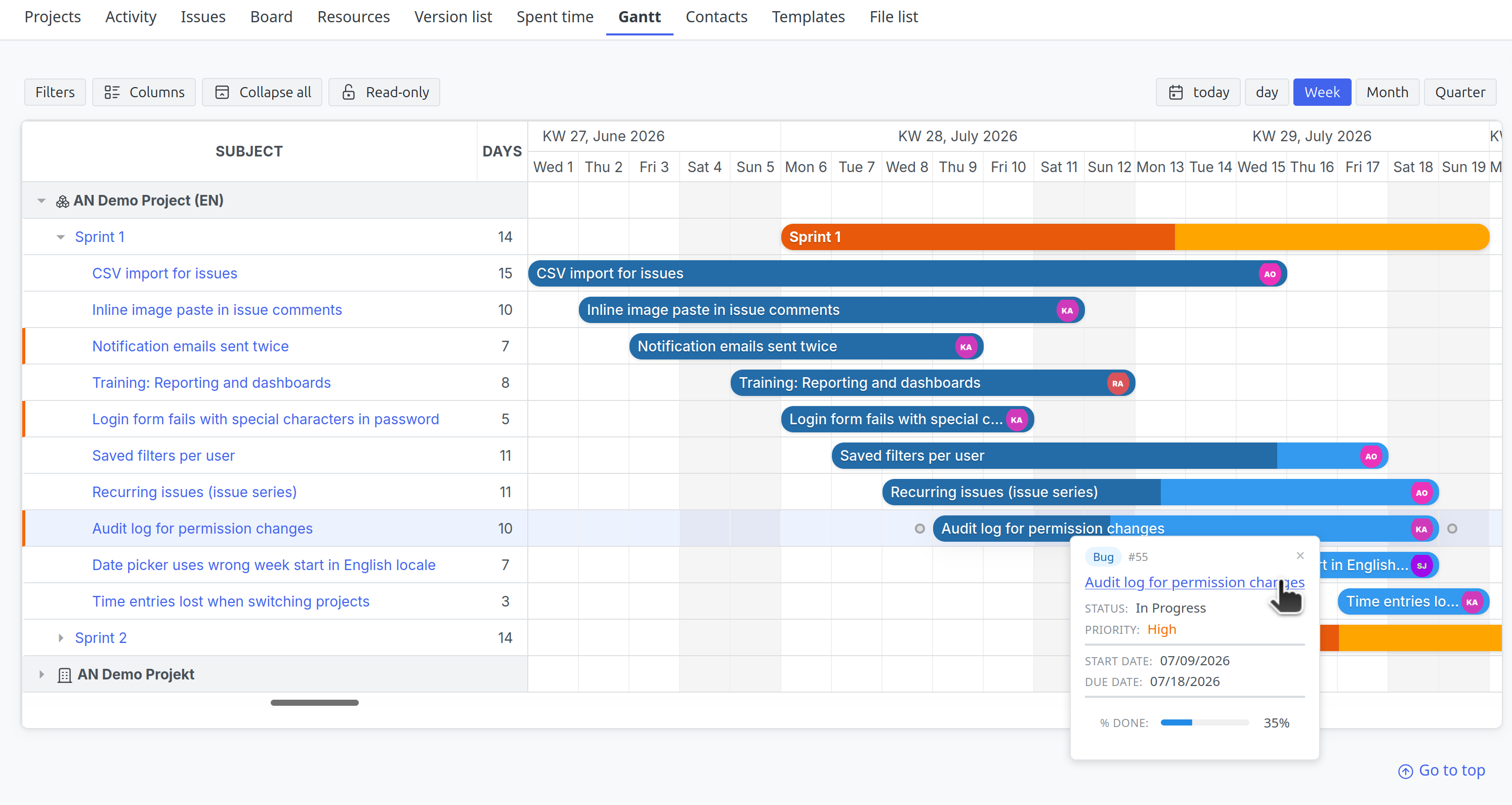
The interactive Gantt chart for Redmine
The standard Redmine Gantt only displays dates. Nothing can be changed there. The Redmine Gantt Plugin replaces that view with a chart you actually work in.
Move bars, adjust duration at the edge, set progress, connect issues by dragging. All without going through the issue form. The plan is not a file sitting next to your work, it is the work itself.
Redmine already ships with a Gantt chart. It shows issues and versions on a timeline, but read-only. Every change to a date goes through the issue form, and with several adjustments that turns into a long series of clicks.
Planning instead of catching up
In the Gantt Plugin you drag the bar to its new position, grab its edge to change the duration, and connect two issues with the mouse to create a precedes and follows relation. Subject and duration can be edited directly in the table next to the chart. The change goes into the issue right away and is recorded in its journal.
Always the real state
The plan does not live in a separate file that someone has to maintain. It consists of the dates in your issues. The whole team works in it at the same time, roles and permissions apply as usual, and the plan never goes stale.
When the Gantt Plugin pays off
The value comes from dates that still move during the project. So in ongoing detail planning, in projects with many people involved, and wherever rescheduling is part of everyday work. If the schedule is fixed after project start and only gets read, the read-only standard Gantt of Redmine is enough.
Your advantages at a glance
Drag and drop on the timeline
Move issues and versions, adjust duration at the end of the bar, set progress directly on the bar.
Dependencies in the chart
Create relations between issues by dragging and remove them with a double click. Existing relations appear as connecting arrows.
Cross-project view
One chart across all projects with the Gantt module enabled. Projects, versions and issues appear in their hierarchy.
Redmine filters and saved queries
The familiar issue filters apply to the chart as well. Saved queries are available in the sidebar.
Zoom levels from day to quarter
Switch between detail and overview.
Versions as their own bars
Versions group the issues assigned to them and can be moved themselves. Progress is derived from the issues.
Read-only at the push of a button
One click locks the view against changes. Useful while reviewing and while presenting.
Non-working days and holidays
Weekends are highlighted, and with the Redmine HRM Plugin the configured holidays and work calendars as well.
Permission-based
Without edit rights the view stays read-only. In the cross-project view this is checked per issue.
Typical use cases:
- Project leads who adjust dates several times during a project and want to keep an eye on the dependencies.
- Teams working with versions or sprints who want to see progress on the timeline.
- Multi-project environments where several projects run at once and time frames overlap.
Part of the Planning Add-On
The Gantt Plugin is part of the AlphaNodes Planning Add-On, together with Issue Checklists, Templates and Timesheet. A detailed feature comparison with the Redmine standard is available on the page Planning Add-On Compared.