
57 percent of companies in Germany use AI, and another 38 percent are planning or discussing it. This is the result of a Bitkom survey from September 2026. At the same time, two thirds of the companies rate the AI skills of their employees as low. This post explains the basics: what AI is, how an AI agent works and what to watch out for when you use it in project management.
What is AI, actually?
When people talk about AI today, they usually mean language models such as ChatGPT, Claude or Gemini. These models were trained on very large amounts of text and learned to understand and produce language. You write what you need in plain words and get an answer, a text, a summary or even program code.
Good to know: An AI does not “know” anything in the human sense. It produces very plausible answers. Most of the time they are right, sometimes they sound convincing and are still wrong.
The idea of artificial intelligence is nothing new, it dates back to the 1950s. AI has long been running in applications such as spam filters or translation programs. It has been on everyone’s lips since the end of 2022 thanks to ChatGPT: since then almost anyone can work with an AI without prior knowledge.
And why is everyone talking about it now?
Many companies are interested in AI because it completes time-consuming tasks in seconds: drafting texts, summarising long documents, writing code or finding bugs. The effects are particularly large in software development. Many companies see AI as a competitive factor, which is why the instruction to use AI often comes straight from management.
The Bitkom survey backs this up: 48 percent of the companies that use AI have significantly sped up internal processes, and 66 percent see their competitive position improved.
Should you be afraid of it?
In my opinion there is no need to be afraid of working with AI, as long as you follow a few rules.
- Check the results. AI makes mistakes. You remain responsible for what you pass on. So always check everything.
- Do not enter sensitive data until it is clear which tool your company has approved. Company secrets, customer data, passwords and contracts do not belong in just any AI tool.
- AI supports, it does not replace. AI tools help with routine tasks you do at your computer. Decisions, coordination and dealing with people remain the job of humans. People are not replaced, their range of tasks will change. And ideally they always have to know more than the tool they supervise, so that they can make the right decision.
What is an AI agent?
An AI chat answers your questions, and you act on them yourself. An AI agent, on the other hand, completes a task on its own, usually in several steps. For example: “Check all open tickets, summarise what is due this week and write me a status report.”
AI agents are a frequent topic in the news right now, but they are still not widespread: Of the companies that use AI or plan to, Bitkom reports that 11 percent already use AI agents, 29 percent are planning to and 31 percent are discussing it.
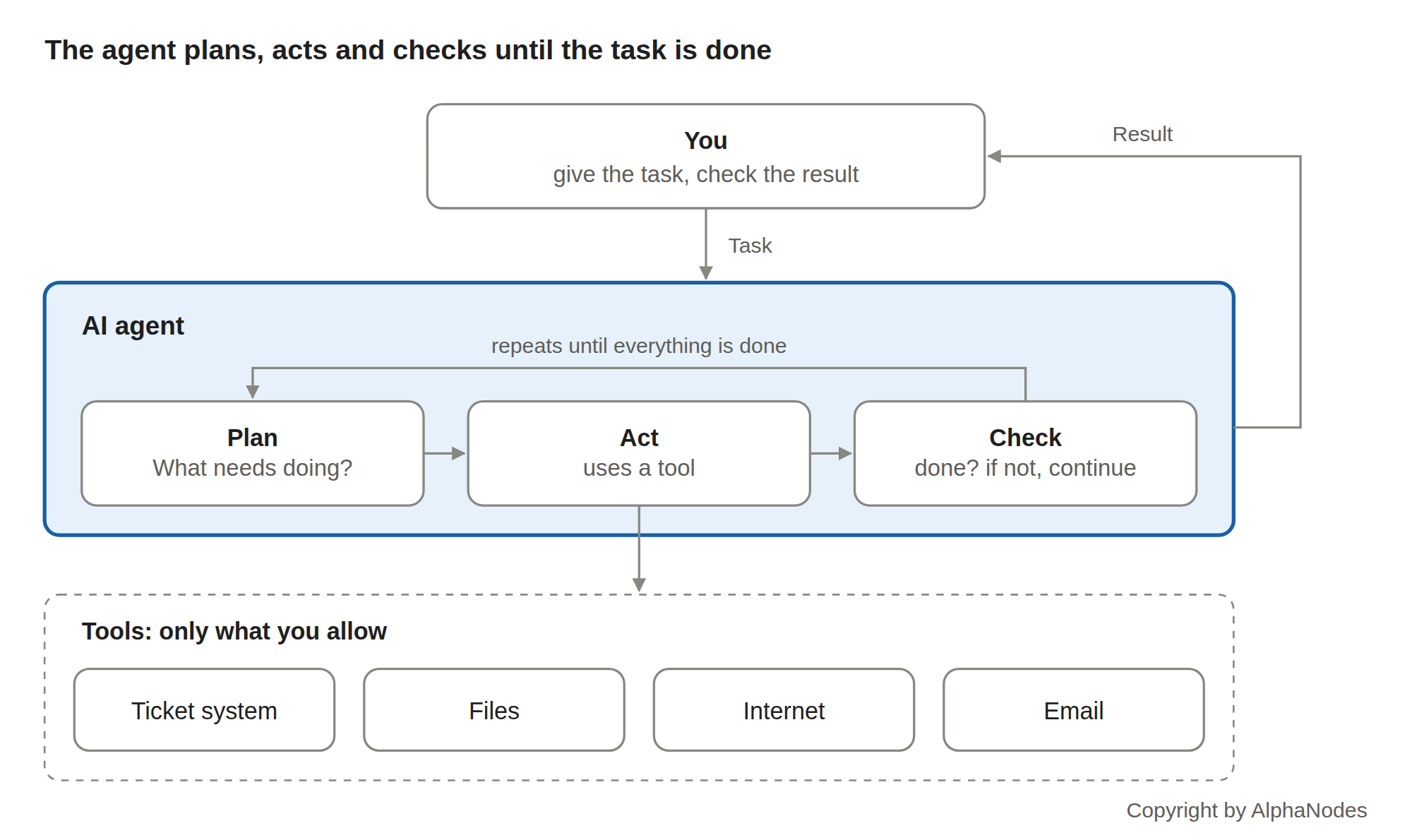
The agent considers what needs doing, uses a tool and checks whether it is finished. If not, it plans the next step. This loop runs until the task is done.
An agent consists of two parts. The first is a language model that can only read and write text. The second is a program that provides the model with tools. The model writes “read ticket 123”, for example, the program executes this and returns the result.
This leads to the most important point: An agent can only use the tools you give it. If it has no access to the ticket system, it cannot read or change anything there.
Where do the tools for the AI agent come from?
A language model can only read and write text. Every tool has to be provided from outside if the agent is supposed to use it. There are four ways to do this:
- Supplied by the AI provider. Services such as ChatGPT, Claude or Gemini come with basic tools, for example web search, reading files or running calculations.
- From the software the AI is built into. If your ticket system or office software has an AI assistant, it uses the functions of exactly that software. The vendor defines through its tools what the assistant may do.
- Connected via interfaces. If the AI is supposed to access other systems, it is connected via interfaces (APIs). Standards such as MCP make this easier. These connections are usually set up by IT or development.
- Self-developed. Developers can build their own tools, such as “fetch project status from the database”, and make them available to the AI.
Definition: MCP (Model Context Protocol) is an open standard that Anthropic introduced in 2024 and that many AI providers support today (source: Anthropic announcement of 25 November 2024).
Be careful with self-developed tools
They often run with a technical account that is allowed to do more than the person giving the task.
Pay attention to three things: The tool only works with the permission of the respective user, it logs every call with time and data, and it carries out critical actions such as deleting, sending or approving only after confirmation. There is also a risk many underestimate: The model reads everything a tool returns, including texts by strangers in tickets or emails. If there is an instruction in there, the model may follow it (the technical term is prompt injection).
What an assistant may use is always decided by the people who set it up. In addition, the access rights of the respective system apply: If the assistant may only read in the ticket system, it cannot change anything there. So when it is introduced, ask which tools are connected and with which rights.
How do you know whether an agent is running?
That depends on how it is started. If you start it yourself, via chat or a button, you usually see an indicator such as “working …” or a list of the steps it is currently processing.
If it runs automatically in the background, for example every night, you recognise it by the results of its work: comments under its own name such as “AI assistant”, notifications with results, or a log in which every action is listed with a timestamp.
With a well configured agent every action is traceable. This is not a side issue: According to Bitkom, 25 percent of AI users name a lack of traceability as an obstacle, and 26 percent poor result quality. So ask the person who sets it up: When does it start, under which name does it act and where can I check what it has done?
Where AI helps you in everyday work
In project management there are many tasks where AI helps you save time. In project management tools such as Redmine, the AI Plugin takes this on, for example by:
- turning meeting notes into clean minutes with a task list
- drafting status reports and emails
- summarising long tickets or requirement documents
- translating customer requests into clear tasks
- explaining technical terms from the development team
Start with a single recurring task. The more precisely you describe what you want, the better the result. For example: “Summarise these notes as minutes, with decisions and open tasks including who is responsible.” If the result does not fit, add to your instruction.
Conclusion
AI is a tool that takes routine work off your hands if you use it deliberately. Check the results, take care of your data and, with agents, clarify what they are allowed to do and where you can trace their work. Then you can use AI safely in everyday project work.
Sources: Bitkom e.V.: Erstmals nutzt die Mehrheit der Unternehmen KI (in German), press release of 14 September 2026. Survey of 603 companies in Germany with 20 or more employees.
Useful links
- Is AI worth it in project management?: four questions about your everyday project work, with an assessment at the end.
- Which AI solution suits you?: three questions on data protection and operation, followed by a recommendation.
- Redmine AI Plugin: AI directly in Redmine, for summaries, similar tickets and your own prompts. In Managed Hosting the model runs in the EU or on your own server.
- Redmine Automation Plugin: if-then rules and recurring tasks without AI. For routine tasks this is often all you need.