
AI in Redmine is no longer a topic for the future. Many teams have an AI connection and find out after a few weeks: the team hardly uses it, or does so reluctantly. Writing a good prompt takes effort, everyone does it differently, and in the end people write the request themselves after all. The key lies elsewhere: in predefined AI prompts that your team runs with one click.
Why does this matter to you as the person responsible for Redmine?
It is up to the admin or the team lead how AI is received in the team. A “here is your access to the AI” usually leads to two problems: the quality of the results varies a lot from user to user, and staff without prompt experience simply do not use the feature. Predefined prompts solve both. They make AI consistent and easy to use for the whole team.
What are predefined AI prompts in Redmine?
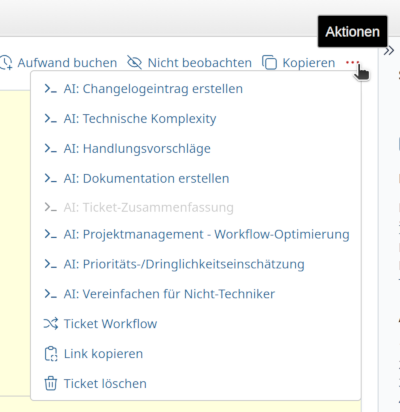
Predefined prompts are reusable instructions to the AI that users with the right permission (e.g. you as admin) write once and make available to your team. They appear where your team already works: in the action menu of the issue view, and on wiki pages as well. One click is enough, and the result appears as a separate block below the issue description. The user does not have to write a prompt, format anything or copy anything.
The result is stored with the issue. Anyone who opens the issue later sees it immediately, without a new AI call and without additional cost. If something has changed in the issue, you regenerate the result with one click. You can also set a prompt to Auto-display. It then runs by itself the first time an issue is opened, for example to create a summary.
The issue view is the most important place, because most roles in a project spend most of their working time there, from office staff and team leads to developers. Typical uses in the issue view are:
- Summarise a long issue in three sentences
- Have priority and complexity assessed
- Describe the status of an issue in customer-friendly language
- Draft a solution that takes similar, already solved issues into account (via RAG, which gives the AI similar issues as additional knowledge)
Prompts are also available as buttons in the editor toolbar. AI Answers writes a reply draft straight into the comment field, which you can adjust before sending. Text correction checks spelling and grammar in any text field and shows the original and the correction side by side.
An example from daily work
A typical issue that different roles in the team look at shows how this works. Issue #2847: “Database performance dropped during month-end closing”. By now 15 comments, technical analysis, several interim results.
1. The office assistant answers a customer enquiry
The customer calls and wants to know where things stand. The office assistant has no technical background and would normally have to read 15 comments or interrupt a colleague. Instead, she opens the issue and picks the predefined prompt “Summarise issue status in customer language” from the action menu. A friendly summary in plain language appears below the issue description. She can read it out to the customer on the phone or send it by email.
2. The managing director checks the project status
He wants to know how much work is still ahead of the team, but has no time to go through technical details. He opens the same issue. He already sees the summary from before, the AI does not have to run again for it. In addition, he picks “Estimate effort and progress”. The AI evaluates the description and all comments and returns: current status, visible next steps and a realistic estimate of the remaining time. A decision is possible in less than a minute, without interrupting the team lead.
3. The developer looks for a comparable solution
He opens the issue and sees the “Similar Issues” box on the issue page without having to click anything. The plugin compares the meaning of the texts, not just individual words, and finds a comparable performance drop from last year, including the solution at that time. Next to it, the “Relevant Wiki Pages” box shows matching documentation. This saves him the research and gives him a starting point for the analysis.
This search is not a prompt but a separate function of the plugin. It requires PostgreSQL as the database with the pgvector extension.
The key point
The admin defined these prompts once. They are available to the roles they were released for. Nobody in the team has to learn how to “write good prompts”. They only need to be adjusted when necessary. Whether an issue has three or a hundred comments, the AI delivers the same kind of summary or estimate. Prompt engineering is set up once centrally, and the team uses it in daily work.
The same principle works in the wiki view, for example to summarise long wiki pages or to check documentation for completeness. When editing a wiki page, a prompt can revise the whole page on request, for example in simpler language. You see the original and the suggestion side by side before applying it. On project dashboards, the AI text block uses a prompt to create, for example, a weekly report on the project status.
What you get out of it
A single AI request saves only a few minutes. Multiplied by the size of the team and the number of issues that are processed, commented on or reviewed every day, it adds up noticeably. On top of that, you can put AI to productive use faster, because nobody has to learn how to write prompts any more. The prompt is already there, the user only has to select it.
Conclusion
A good model alone does not make AI in Redmine productive. What matters is that you give your team the right tools: prompts that fit the model in use and run with one click. Predefined prompts make AI consistent, easy to use and reproducible.
With the AlphaNodes Redmine AI Add-On you set up the prompts once centrally, and the whole team benefits. Whether you use an external provider such as OpenAI or Claude or your own GDPR-compliant Ollama setup in the background is up to you.
Further reading
- AlphaNodes Redmine AI Hosting
- Managed Redmine Hosting at AlphaNodes
- Is AI worth it in project management? Four questions to find out
- Redmine AI decision tool