
Today we briefly introduce the application log of the Reporting Plugin, which has proven especially valuable in larger teams where questions often arise that Redmine’s regular activity log cannot answer.
The Reporting Log records additional activities in your Redmine instance and makes them easier to search, store, and export when needed.
What Gets Logged?
The Reporting Log captures two categories of events: authentication and data changes.
For authentication, both successful and failed login attempts are recorded. This helps you identify unusual patterns - for example, when a user account is repeatedly targeted with incorrect passwords.
For data changes, the system logs CRUD operations (Create, Read, Update, Delete) on the most important Redmine objects. When someone creates a ticket, renames a project, or deactivates a user, a corresponding entry appears in the log. Categorized by log level (Debug, Info, Warning, Error, Fatal, Unknown).
Reporting Log: Feature Overview
Here is an overview of the current plugin version 4.3.0 regarding the activities that are logged:
| Logging Feature | Reporting Application Log |
|---|---|
| Authentication | |
| Login successful | Yes |
| Login failed | Yes |
| Logout | Yes |
| Data Changes | |
| Object created (Create) | Yes |
| Object modified (Update) | Event only |
| Object deleted (Delete) | Yes |
| Read Access | |
| Profile viewed | No |
| Ticket viewed | No |
| Attachment downloaded | No |
| Data Exports | |
| CSV/XLSX/PDF export | No |
| API bulk requests | No |
| Permissions | |
| User added to project | Partial |
| Role changes | No |
| Admin status changed | No |
| Access Denials | |
| Failed access attempts | No |
| Log Integrity | |
| Tamper protection (checksums) | No |
| Cryptographic chaining | No |
| Additional Features | |
| Filterable query interface | Yes |
| Export (CSV, XLSX) | Yes |
| Syslog integration | Yes |
| Configurable retention | Yes |
| Project-based visibility | Yes |
Project-Based Visibility
The Reporting Log works with Redmine’s permission system. You can define per project which roles have access to the log entries.
In practice, this means that a project manager only sees activities in their own projects, while administrators can access all entries across projects. This separation is particularly helpful in environments with multiple clients or departments, where not everyone should see activities that don’t concern them.
Filtering and Searching
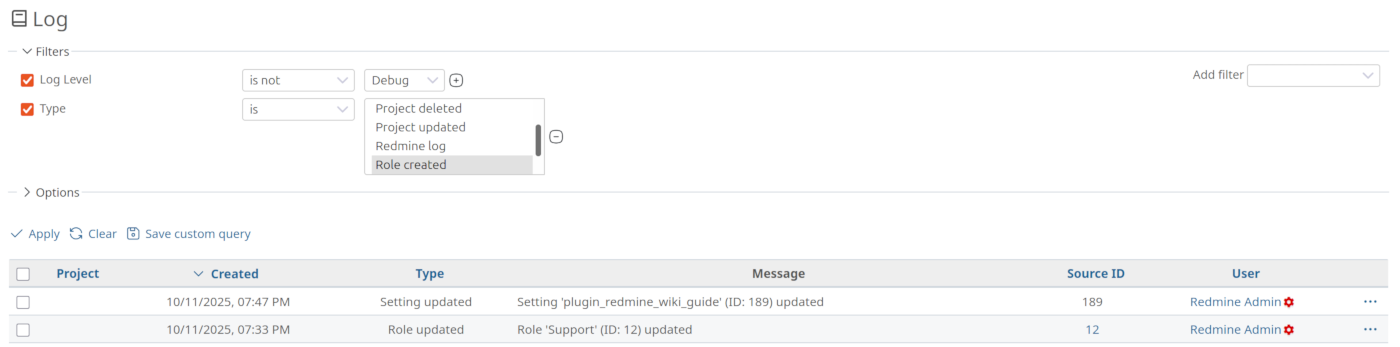
As is typical in Redmine, log entries are also displayed through a query interface that you already know from other Redmine lists (e.g., ticket list). You can therefore filter entries by criteria relevant to you:
- Time period (from/to)
- User
- Project
- Type of action (Login, Creation, Modification, Deletion)
- Affected object (Ticket, Project, User, etc.)
Filters can be combined. If you want to know which tickets a specific user edited last week, you select the appropriate filters and options and receive a clear list of logged entries.
Export for Further Processing
You can export the filtered results as CSV or XLSX when needed. This is useful when you want to process the data in other programs - for example, for reports or archiving.
The export contains all visible columns and respects the applied filters. So you export exactly what you see on the screen.
Syslog Integration
For environments with centralized log management, the Reporting Log offers syslog integration. Entries are then additionally sent to a syslog server, where they can be analyzed together with logs from other systems.
This is particularly relevant in larger IT infrastructures where a central log management system (SIEM) is in use. Redmine activities then seamlessly integrate into the overall picture.
And questions like: “Can I view Redmine logs directly in the web interface?” are answered more easily.
Configure Log Retention
Log data grows over time. The Reporting Log offers configurable retention periods. You define how long entries should be stored before they are deleted. A rake task is available for manual cleanup.
The task is suitable for cron jobs if you want to automate retention. Depending on requirements, this can be one month, 90 days, or one year, etc. Automatic deletion runs in the background and ensures that the database doesn’t grow unnecessarily.
Setup
Once the Reporting Plugin is successfully installed and configured, the log also works and records new entries. It’s important that you grant the permission to view log entries in the roles.
Existing activities from the past are not captured retroactively - the log begins with activation.
Typical Use Cases
The Reporting Log answers questions like:
- Who deleted a ticket?
- Did someone log in outside of working hours?
- Were an unusual number of user accounts modified?
- Who last made changes to the Redmine configuration?
This information is not readily available in normal Redmine operation. Journal entries for tickets do show changes, but a system-wide overview is missing, and deletions are not logged at all.
Tip: You can easily save the entries relevant to you as a custom query and integrate them into a dashboard block - then you always have changes that require closer analysis on your radar.
Limitations of the Reporting Log
The Reporting Log is not a complete audit trail in the sense of compliance frameworks. It logs that a change occurred but does not store before/after values. Pure read access (who viewed which ticket) is also not currently captured.
For many teams, however, the Reporting Log is sufficient to gain transparency about system usage. Those with stricter requirements - for regulatory reasons, for example - should check whether additional measures are necessary. These can potentially be covered with the Automation Plugin and the “Add log entry” action, if it is also in use.
Who Benefits from This Feature?
The Reporting Log brings transparency to your Redmine usage. You see who logs in when and what changes are made. Project-based visibility, flexible filters, and export functions make it a practical tool for everyday work with Redmine.
Larger teams and organizations with multiple clients or departments particularly benefit, where traceability and data separation are important. Project managers keep track of their projects, administrators can act system-wide, and IT security officers can identify unusual login patterns early.
The feature presented here is part of the Reporting Plugin. The Reporting Plugin is available individually or as part of the Enterprise+ Bundle and can also be used as part of our Redmine hosting offer. Information about our Managed Application Hosting for Redmine can be found here on the website.