
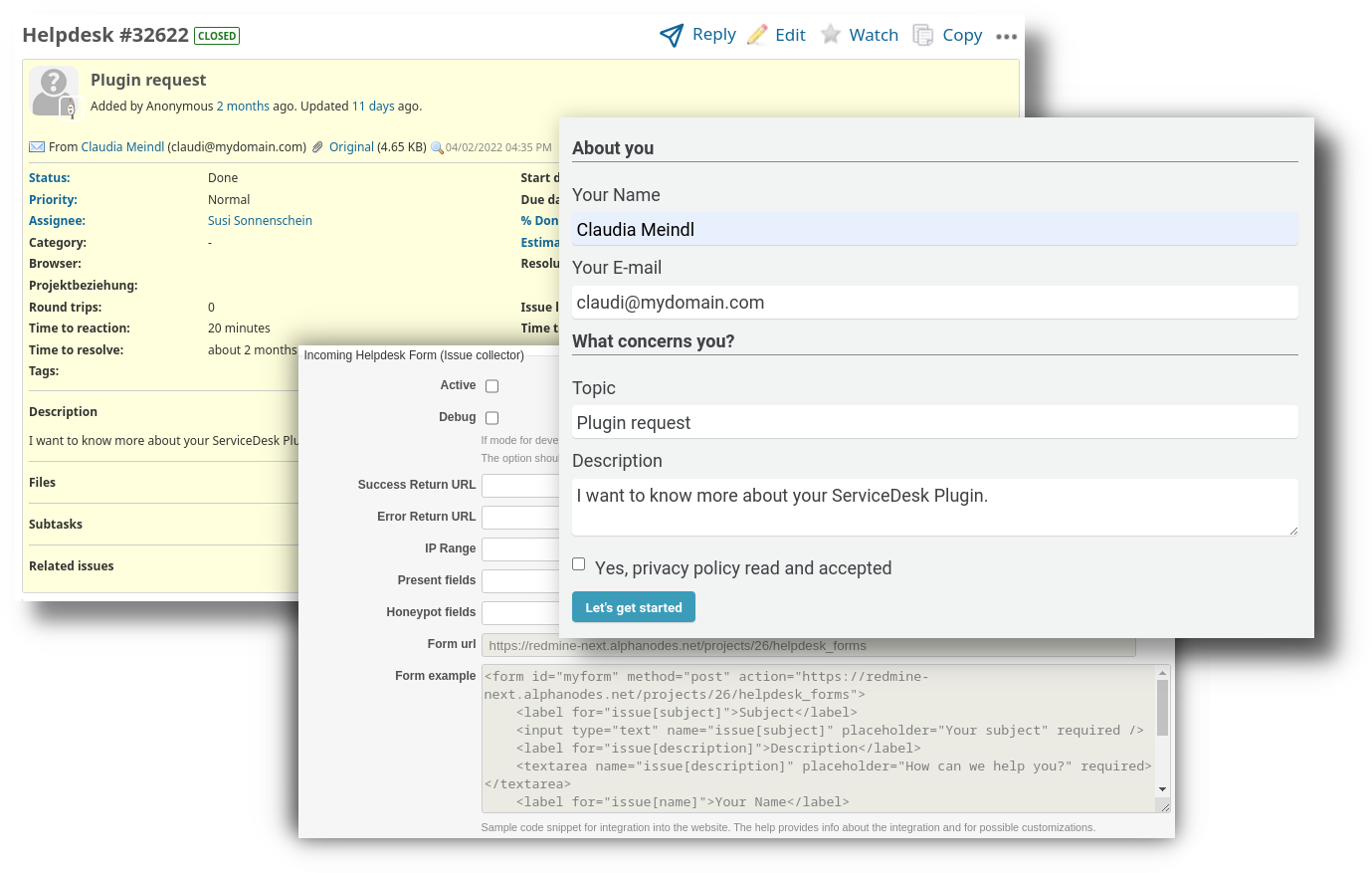
Redmine ServiceDesk is a commercial plugin for Redmine that provides comprehensive service desk functionality. Using the integrated “Issue Collector” feature, you can set up web forms and capture their submissions as helpdesk tickets. In today’s blog post, we give a brief overview of this feature.
Who is this feature for?
The web form feature is aimed at users with basic HTML knowledge and familiarity with the required fields within your Redmine system. You should know how a simple HTML form is structured (<form>, <input>, <select>). Programming skills are not strictly required but helpful — integration is done via copy & paste with adjustments to the field names as specified by your Redmine instance.
 Learn more about the ServiceDesk Plugin for Redmine here on our website.
Use cases
- Form-based service requests: Employees can order hardware, request software installations, or apply for access permissions
- Customer support and structured ticket creation: A contact form on your website — inquiries are automatically captured as tickets
- Feedback: Collect customer feedback or improvement suggestions directly in Redmine
How it works
Activate the form: In the project settings under Helpdesk → Incoming Helpdesk Form, enable the option. You will receive a form URL for your project.
Set return URLs: Define where users are redirected after submission (success and error pages).
Embed the HTML form: Create a form on your website that submits to the form URL. The field names determine which ticket attributes are populated.
That’s it — every form submission automatically creates a helpdesk ticket in the assigned Redmine project. Using ticket filters or search, you can quickly find and distribute the requests within your Redmine. Or you can set up an automation rule for automatic processing.
Feature overview
| Feature | Description |
|---|---|
| Ticket fields | Subject, description, tracker, category, priority |
| Custom Fields | Populate custom Redmine fields directly |
| Structured input | Combine multiple form fields into a single description |
| Spam protection | Honeypot fields, IP restrictions, DNS blacklists |
| Contact management | Senders are automatically registered as contacts |
Strengths
- Low barrier to entry: No backend code, no API token management, no authentication. Build an HTML form, embed it in your website, fill it out, submit — done.
- Quick proof of concept: A working contact form that creates real tickets in just minutes.
- Contact creation included: Senders are automatically registered as contacts — including history for follow-up requests.
- Spam protection out of the box: Honeypot, IP filtering, DNS blacklists — all configurable.
Note: For more complex requirements, we recommend the Redmine REST API (see below).
Web form or API?
The web form feature is ideal for simple to moderate requirements:
- Contact forms with a few fields
- Simple service requests
- Feedback forms
- Relatively quick integration without extensive development effort
When to use the Redmine REST API
For extensive or complex forms, we recommend using the Redmine REST API directly:
| Requirement | Web form | REST API |
|---|---|---|
| Simple contact form | ✓ | - |
| Few fields (5-10) | ✓ | - |
| Many fields (>15) | - | ✓ |
| Conditional logic (field A shows field B) | - | ✓ |
| Multiple file attachments | - | ✓ |
| Validation before submission | - | ✓ |
| Integration into existing applications | - | ✓ |
| Automated processes (CI/CD, monitoring) | - | ✓ |
| Basic HTML knowledge sufficient | ✓ | - |
| Developer skills required | - | ✓ |
Good to know: Our plugins extend the Redmine REST API with additional endpoints — for contacts, helpdesk tickets, or automations, for example. With a support license, you get access to the complete API documentation.
Tip: Start with a web form for a quick proof of concept. As requirements grow, you can switch to the API later — the tickets and contacts already created are preserved.
Conclusion
With the web form feature, you can turn any HTML form into a ticket intake channel. Setup requires only basic HTML knowledge — ideal for quick integrations without development effort. The ServiceDesk plugin is part of the Enterprise+ bundle, as it requires the Reporting and Automation plugins as a foundation. If you prefer not to handle the bundle installation yourself, you can take advantage of our Redmine Managed Application Hosting offering. The plugins are already integrated on request.
Find all information about our Managed Application Hosting offerings for Redmine here on our website. And take a look at our Plugins for Redmine 6.1, available as single or bundle versions.
Recommendation: How public-sector IT bundles helpdesk, knowledge management, and asset management in a single GDPR-compliant Redmine solution is shown in our whitepaper: Redmine in the Public Sector.