
Plugin Version 4.3.0 now available
Version 4.3.0 of our Redmine plugins has recently been published. The new version brings significant improvements to project management workflows and user experience. This release is specifically optimized for Redmine 6.1 and requires Redmine 6.1.x and Ruby 3.2 or newer.
Important: Version 4.3.0 no longer supports Redmine 6.0.x. Please ensure your Redmine installation is updated to version 6.1 before upgrading to this plugin version.
Redmine Reporting - Enhanced Task Board Experience
The Reporting Plugin receives major task board enhancements that streamline your daily workflow and make project management more intuitive.
Avatar Bar for Quick Team Assignment
The new avatar bar in the task board view enables drag & drop assignment of project members to issues. Simply drag a team member’s avatar onto an issue card to assign them. Hold the Shift key while dropping to add an assignment comment at the same time. This visual approach makes team coordination faster and more efficient.
Dynamic Task Board Grouping
Task boards now support dynamic grouping with intelligent drag & drop functionality. When you move an issue card between groups, both the status and the group value are updated automatically. Available grouping options include Project, Tracker, Priority, Target version, Assigned to, and Category (in project context). This allows you to organize your work exactly the way your team needs it.
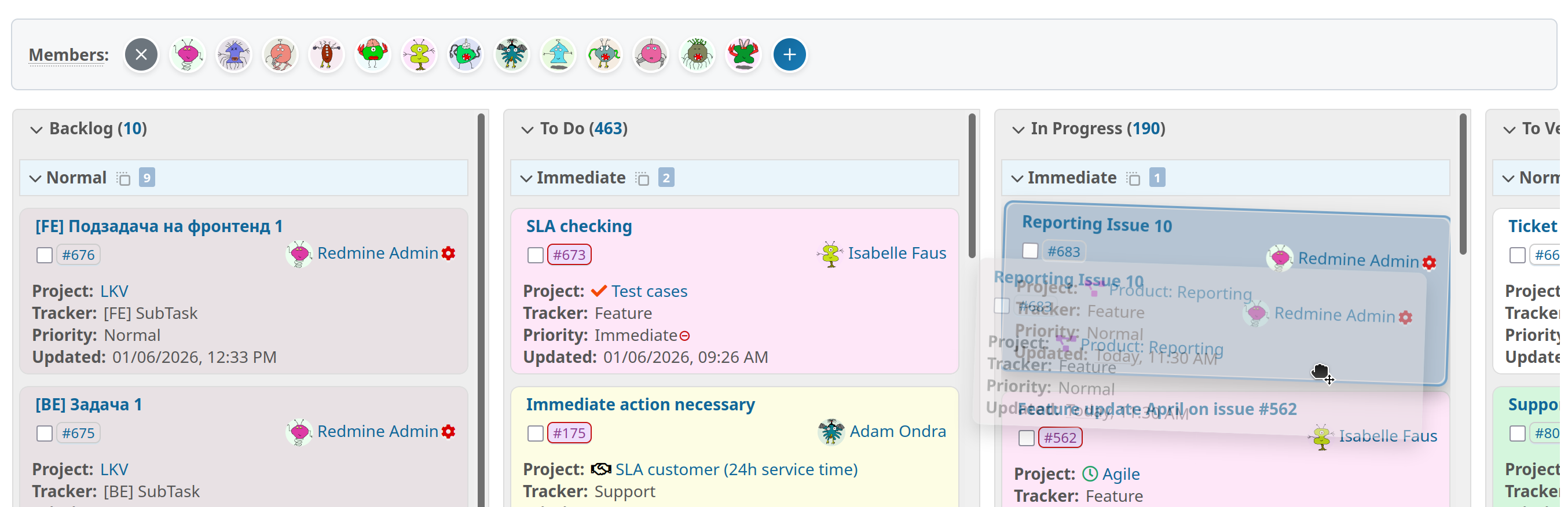 The advanced grouping function allows two values to be changed using drag & drop.
Learn more in our Blogpost: Visual Workflow Manager: The Taskboard in the Reporting Plugin
Additional Reporting Improvements
- Extended Reporting log now includes Redmine core messages for comprehensive system monitoring
- Special visual indicators for issues with relations in task board view of the issue list
- Performance improvements when editing users with many project memberships
- Improved task board card design
- Email sending to invoices and contacts is now logged under /log (requires ServiceDesk)
Redmine HRM - Better Time Tracking Overview
The HRM Plugin introduces new features for attendance management and time tracking.
Total Hours Display in Attendance Queries
HRM attendance queries now display total hours and duration for time-based attendance entries, giving you quick visibility into logged time without manual calculations. This is particularly useful for project managers and HR staff who need to monitor working time at a glance.
Smarter Attendance Limits
Attendance type limits now automatically convert hours to days for hourly attendance types based on your configured working time calendar. Instead of counting individual bookings, the system now provides a more accurate representation of actual working time.
Enhanced Absence Management
- Range-defined absence types are now supported for users with required attendance accounting
- New validation prevents absence hours from exceeding working hours for range-defined attendance types
- Warning dialog when changing user type from “Internal” to “Non-Internal” helps prevent unintended removal of working time calendars and attendance limits
Usability Improvements Across All Plugins
Several features have been implemented across multiple plugins to enhance your daily work experience.
Sticky Headers with “Go to Top” Action
Sticky headers have been added to DB, Passwords, and ServiceDesk plugins, keeping important navigation and action buttons visible as you scroll through long lists. An integrated “Go to top” action allows quick navigation back to the beginning of the page.
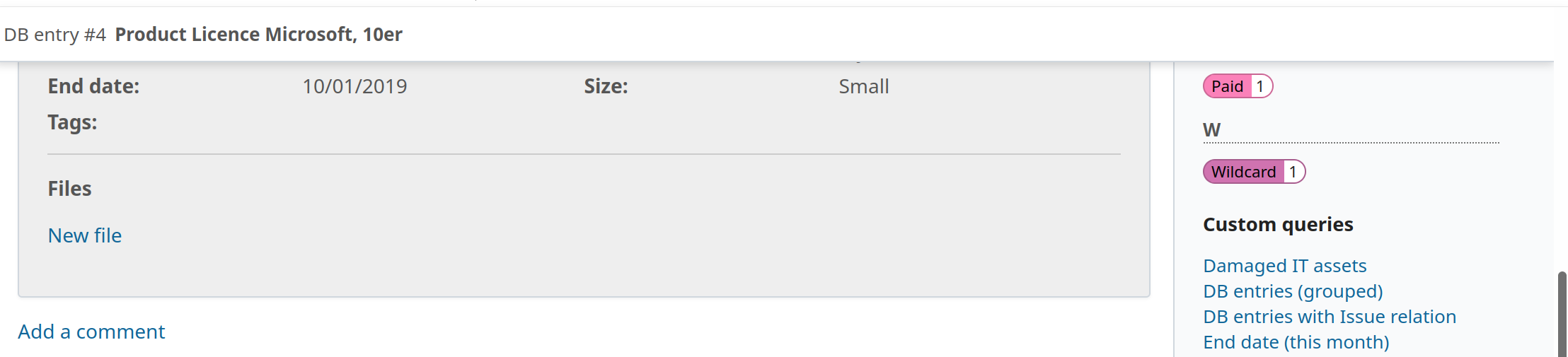 Sticky Header support is coming with this version to our plugins.
“Copy Link” Functionality
All plugins now feature “copy link” actions in their list context menus, making it easier to share specific filtered views with team members:
- DB Plugin: Database list context menu with filter functionality
- HRM Plugin: Attendance and user lists with filter functionality
- Passwords Plugin: Password list context menu with filter functionality
- Reporting Plugin: Reporting logs with filter functionality
- ServiceDesk Plugin: Contacts, invoices, and canned responses with filter functionality
- WikiGuide Plugin: Wiki list context menu with filter functionality
Redmine Automation
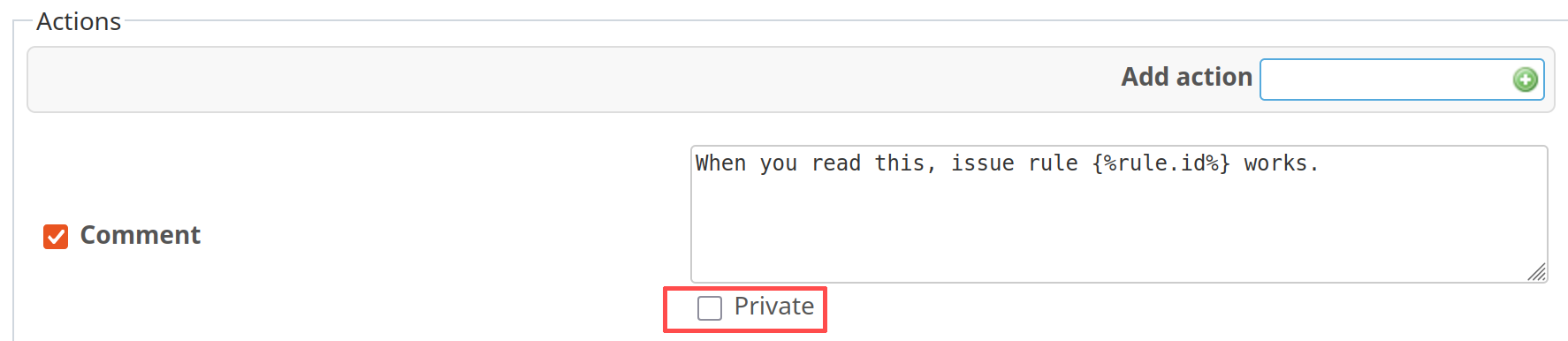
- New: Issue action “Private note” for Save Issues and Scheduled Issues triggers
- Improvement: Controlled execution of asynchronous jobs for better performance
- Bug fixes: Fixed time_entry.hours variable returning correct Float values, webhook API hours field, and watcher-related errors in scheduled automation rules
Redmine DevOps
- New: Status badge styling for Hetzner server list dashboard block (extended list style)
- Bug fix: Commits with spent time now correctly use current user instead of anonymous
Redmine Passwords
- New: File attachments can now be added to password entries
- Improvement: Copy to Clipboard functionality fully compatible with Redmine 6.1
Redmine ServiceDesk
- New: Macro support for contact_tag, contact_tag_count, invoice_tag, and invoice_tag_count
- New: Inline image support for outgoing helpdesk mails, contact mails, and invoice mails
- New: Email sending to invoices and contacts is now logged for better traceability
- New: Issue filter for helpdesk contact emails
- Improvement: Copy to Clipboard functionality fully compatible with Redmine 6.1
- Bug fixes: Local avatar positioning for Redmine 6.1, compatibility with Redmine “Reactions” function, and improved performance for helpdesk tickets with file attachments
Redmine WikiGuide
- Improvement: Comprehensive revision of language files and copy link action
The products mentioned above are all part of the Enterprise+ Bundle.
Conclusion
Version 4.3.0 represents a significant step forward in usability and workflow optimization. The enhanced task board functionality in the Reporting Plugin, combined with improved time tracking capabilities in the HRM Plugin, will make your daily project work more efficient and intuitive. The unified “copy link” functionality and sticky headers across all plugins demonstrate our commitment to a consistent, user-friendly experience.
This release is specifically optimized for Redmine 6.1, ensuring you benefit from the latest improvements in the Redmine core system. Numerous bug fixes and performance improvements provide a stable and reliable foundation for your project management needs.
Professional Redmine Update
Customers whose Redmine we manage, or who use a Redmine Hosting package with us, don’t need to worry about updating to the latest plugin version. We’ll take care of that for you.
All information about our extensions for Redmine can be found on the product page. The plugins are available individually or in a bundle. Use is only possible according to our minimum requirements. Alternatively, you can book our Managed Application Hosting for Redmine. In our freely accessible online demo, you can test the functionalities of the current Redmine version together with our plugins. For questions that our product pages, FAQs, or online trainings don’t answer, we’re happy to help. Send us a message.