
Plugin Version 4.5.0 Now Available
Version 4.5.0 of our Redmine plugins contains new features, improvements and bug fixes. The most important changes are the reworked Task Board with swimlanes and WIP limits in the Reporting Plugin, new e-invoice document types (credit notes and corrections) and selectable payment methods in the ServiceDesk Plugin, and new HRM tools for our AI Plugin. In addition, there are smaller changes, performance optimizations and security updates across all plugins.
Important note on Redmine compatibility: Version 4.5.0 is the last version that supports Redmine 6.1x. An update to Redmine 7 is not yet supported by this version - compatibility with Redmine 7 is planned for the next plugin version.
Two New Plugins Available
With this version, two new plugins are available:
- New: Redmine Templates - Templates for issues, notes, projects and wiki pages. The plugin is the successor to the previous ServiceDesk canned responses and can be used across plugins.
- New: Redmine Timesheet - Recording and evaluating efforts in a timesheet view.
Redmine Automation
Rules can now be configured to make changes without triggering the usual email notifications. This is useful for automatic bulk changes where the people involved should not receive notifications.
- New: Notification suppression per rule - a rule can make changes without triggering the usual email notifications. The change remains visible in the issue history, explicit “send email” actions are still delivered.
- New: New variables for the relative week and relative year (e.g. next week, previous year) in actions and conditions.
- New: Collapsible variable cheat sheet (“Show variables”) in all forms that support Automation variables.
- Improvement: Issues and projects from template projects no longer trigger event rules, schedules or reminder emails.
- Improvement: Conditions with filter fields that are invalid for the trigger are rejected on save or safely skipped at runtime and noted in the reporting log.
Redmine DB
- New: Auto-mapping for CSV import.
- New: Actions menu on the entry detail page with a new “Copy link” action.
- New: DB entries are recorded in the reporting log and available there as query and file containers (if the Reporting Plugin is installed).
- Improvement: User fields now use the central field format with the new “All active users” option (excludes locked logins). Existing fields are migrated automatically.
- Improvement: Chart blocks load on demand (lazy loading).
Redmine DevOps
- Improvement: Reworked Hetzner server detail view - server status as a colored badge, city as a short code with a location tooltip.
- Improvement: The changeset matrix chart on the dashboard loads on demand (lazy loading).
- Bug fix: Fixed detection of deprecated Hetzner server types and stabilized repository webhook triggering.
Redmine HRM
With version 4.5.0, the HRM Plugin provides new tools for our AI Plugin: if the AI Plugin is installed, the AI can use them to search users and to log and search attendances. The AI functionality itself comes from the AI Plugin - the HRM Plugin supplies the matching HRM-specific tools. In addition, holidays can now be imported and exported in iCal format, which makes manual maintenance easier.
- New: New HRM tools for our AI Plugin - with the AI Plugin installed, the AI can search users and log and search attendances.
- New: iCal import and export for holidays (single-day holidays are imported; multi-day ranges such as school holidays are intentionally skipped).
- New: New “involved user” issue filter to reliably find all issues a user is involved in.
- New: Read-only timesheet in the “Spent time” tab of the user profile (respects the week-start setting).
- New: Warning dialog when switching a user from internal to external.
- Bug fix: Fixed daylight saving time bug - attendance times are stored as absolute timestamps.
- Improvement: Compatibility with the current Redmine master (Rails 8.1).
Redmine Passwords
- New: Auto-mapping for CSV import.
- New: Actions menu on the password detail page with a new “Copy link” action.
- New: Passwords are recorded in the reporting log and available as a query (if the Reporting Plugin is installed).
- Improvement: Note-only changes now update the password’s modification date.
- Improvement: The matrix chart loads on demand (lazy loading).
Redmine Reporting
The central change in version 4.5.0: the Task Board has been fundamentally reworked. It is now a continuous matrix with real swimlanes, a sticky column header, two-axis drag & drop and WIP limits per status column. Cards can be edited and commented inline.
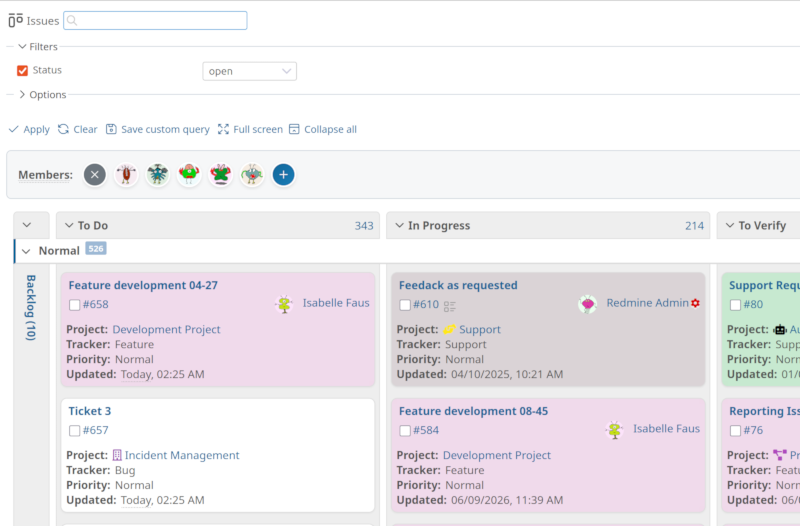 Reworked Task Board with swimlanes and WIP limits
- New: Task Board revision - continuous matrix with real swimlanes, WIP limits per status column, inline editing and comments directly on the cards, and drag & drop across both axes.
- New: Templates from the Templates Plugin (issue, note, project, wiki) are recorded in the reporting log and link to the respective template page.
- Improvement: Modernized burndown charts with gradient fill, scheme-driven colors and a conditional today marker.
- Improvement: Modernized counter box card design with contrast-aware value colors.
- Improvement: Update to Mermaid v11.16.x.
- Improvement: Significantly optimized visibility check for time entries (up to ~97% smaller SQL condition for users with many project memberships).
- Bug fix: Temporal adverbs (e.g. “2 hours ago”) now use the user time zone instead of UTC in time columns.
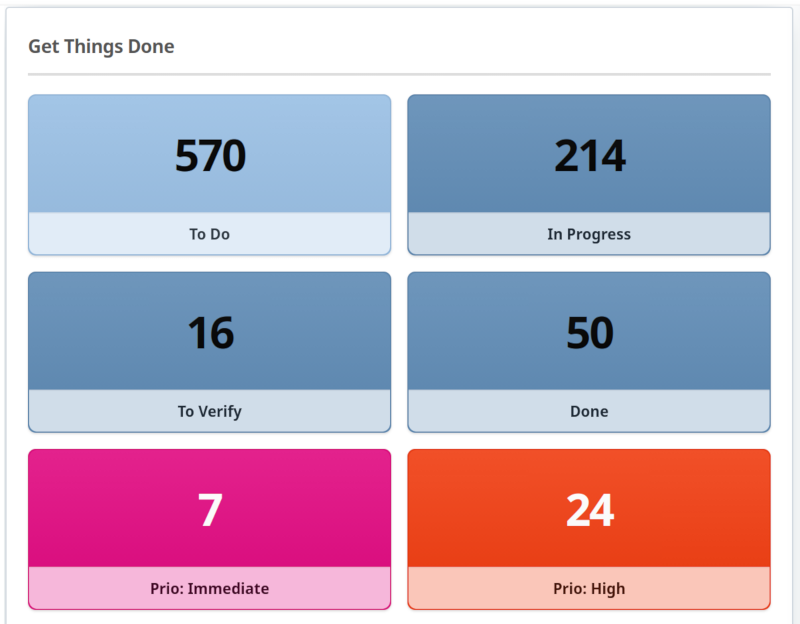 Modernized counter box design with contrast-aware value colors
Redmine ServiceDesk
With version 4.5.0, the e-invoice has been extended: credit notes and corrections are now separate document types with separate number ranges. For each invoice, the payment method (bank transfer, PayPal, SEPA direct debit, netting) can be set, which controls the payment path and e-invoice accordingly.
- New: Credit notes and corrections as separate invoice document types with separate number ranges, content locking and e-invoice billing references.
- New: Per-invoice payment method (bank transfer, PayPal, SEPA direct debit, netting) - controls the payment details in the e-invoice (XML) and PDF, including SEPA mandate management per contact.
- New: User-format custom fields get a selectable user scope (all users, all active users, project members, or by role) - e.g. to store a customer’s user logins directly on the contact.
- New: Auto-mapping for CSV import and support for issue tags.
- New: Canned responses were removed and replaced by the Templates Plugin (existing canned responses are migrated automatically if the Templates Plugin is installed).
- Improvement: Invoice payment receipts are documented as non-editable history entries.
Redmine WikiGuide
- New: Wiki pages can carry user-format custom fields, with a selectable user scope.
- Bug fix: Fixed an internal error when changing wiki page attributes.
The products mentioned above are all part of the Enterprise+ Bundle.
Conclusion
Version 4.5.0 includes changes across all our plugins. The relevant new features are the reworked Task Board in the Reporting Plugin, the extended e-invoice and payment functions in the ServiceDesk Plugin, and the new HRM tools for our AI Plugin. Added to that are the two new plugins Templates and Timesheet, along with performance optimizations, security updates and smaller fixes across all plugins.
Please note: version 4.5.0 is the last version for Redmine 6.1x. We are planning support for Redmine 7 for the next plugin version - exactly the right time to prepare your next major Redmine update.
Professional Redmine Update
Customers whose Redmine we manage, or who use a Redmine Hosting package with us, do not need to worry about updating to the latest plugin version. We take care of that.
All information about our extensions for Redmine can be found on the product page. The plugins are available individually or as a bundle. Use is only possible according to our minimum requirements. Alternatively, you can book our Managed Application Hosting for Redmine. In our freely accessible online demo, you can test the functionalities of the current Redmine version together with our plugins. For questions that our product pages, FAQs, or online trainings do not answer, we are happy to help. Send us a message.