Anyone who coordinates tasks, availabilities and deadlines by hand loses the overview quickly. Mistakes creep in. This is where the HRM plugin for Redmine comes in.
Instead of spreadsheets and manual task distribution, the plugin plans your resources by fixed rules. That gives you and your team six advantages.
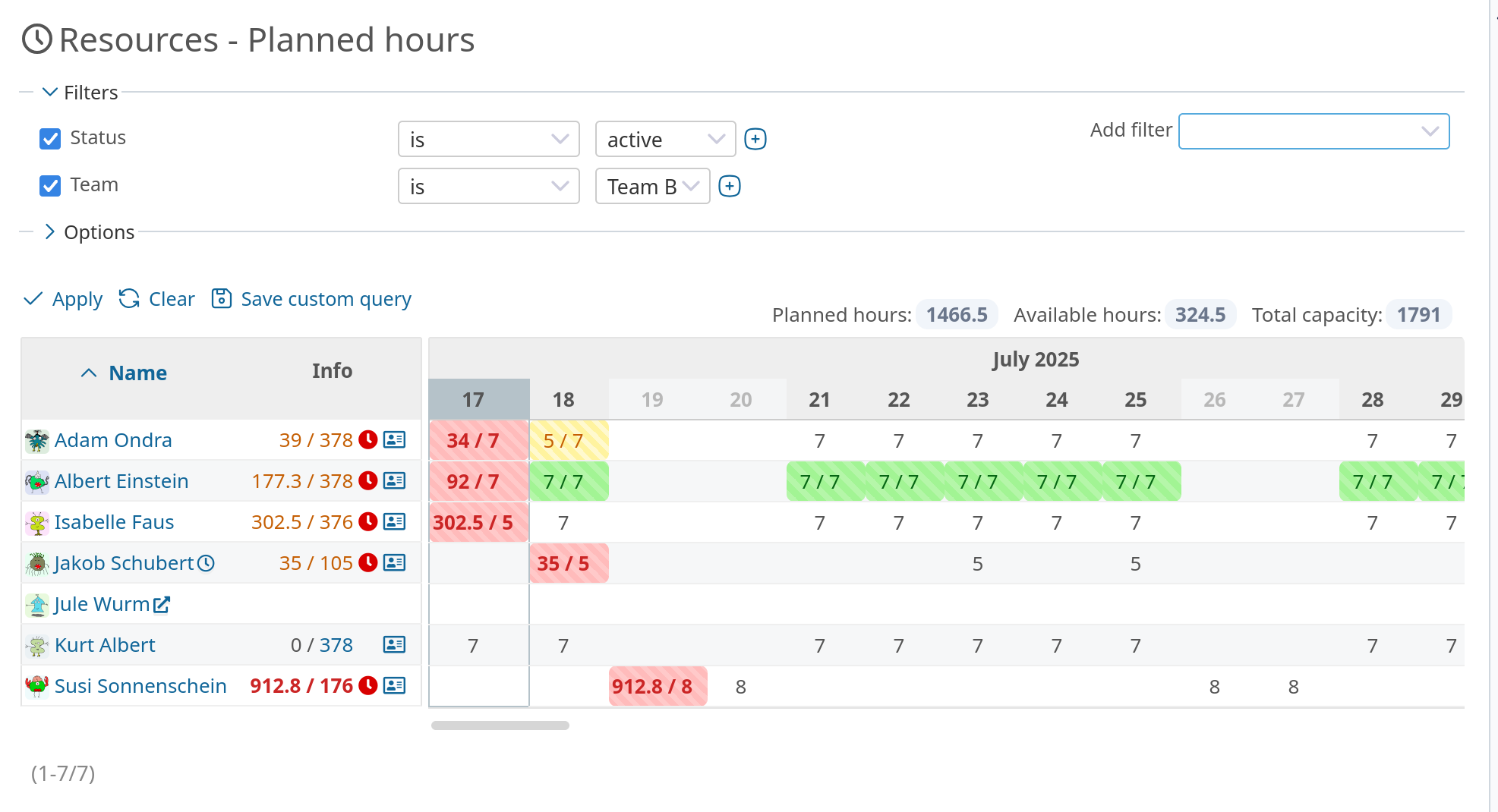
New in v4.6.0: Above the table you find the utilization as a key figure, the planned hours in relation to the total capacity of the selected period. A click on a day opens a card with the issues scheduled for it, including hours, project and priority. The issues link straight to their page.
More time for what matters: less micromanagement
The plugin distributes the issue estimates over the working days automatically. So you do not have to schedule every single issue assignment yourself. The basis for this are the stored estimates, deadlines, availabilities and calendar data. That leaves more time for strategic decisions.
Realistic planning through complete data integration
The workload function takes into account:
- working time models (full-time, part-time)
- vacation and sick leave
- issue estimates and deadlines
- issue priorities
This results in a realistic forecast of whether an employee completes their tasks on time. With manual planning exactly that gets lost easily.
Automatic updates on changes
Every relevant change goes straight into the plan, whether it is an absence, a deadline or an estimate. The resource view therefore stays up to date without anyone maintaining it. That counts especially with several projects running in parallel.
Early warning for overload and conflicts
The resource view for the planned hours shows right away:
- which employees are overloaded
- where deadlines are about to be missed
- which colleagues have idle time
Project management spots critical situations early and steps in before problems arise.
Consistency and transparency through clear rules
The automated planning follows a fixed set of rules that can only be changed within limits. The planning stays comprehensible and consistent, no matter who does it.
Self-organization instead of top-down control
Anyone who sees their own workload acts more responsibly. Everyone recognizes what is feasible and what is not.
Automation as a success factor in project planning
Automatic resource distribution with the workload function is more than a convenience feature. Used consistently, you plan more reliably, know your capacity limits and keep the overview in daily project work.
For project managers this means less effort, more reliability and teams that approach their tasks with realistic expectations.
Note: A solid data basis (estimates, deadlines, working time calendars) is the foundation for reliable planning. The cleaner the input, the greater the benefit.
What to consider when using the HRM plugin instead of manual planning
If you are considering the HRM plugin, keep the following in mind:
Limited flexibility due to fixed rules: The HRM plugin is based on a fixed set of rules. Issue planning follows priority, deadlines, working time and estimates. If you want to pull a low priority issue forward deliberately, you have to work through priorities or dates.
- More training and adjustment needed: Teams that have planned purely manually so far have to adapt. That costs time and energy at first:
- users need to understand which factors go into the planning
- you need clear processes for maintaining estimates, deadlines and attendances
- without an introduction and training, the risk of wrong usage and misunderstandings grows
- Dependency on data quality: Without consistent maintenance of issues and the required resource data, the workload view does not work reliably.
- No estimates → no planning
- No deadlines (version assignment, due dates) → no distribution
- Wrong working time calendars and attendance entries → unrealistic utilization
- No replacement for communication: The plugin helps with planning, not with coordination. The HRM plugin does not replace team communication, daily check-ins and individual ways of working.
Target groups: who is the HRM plugin for?
Ideal for:
- teams with several projects running in parallel
- IT, service or agency companies that estimate and distribute tasks in a standardized way
- organizations with clearly defined processes and a sense of responsibility
- teams with a focus on agility, transparency and self-management
Less suitable for:
- small-scale, spontaneous ad-hoc planning
- small teams or individuals with little standardization
- projects without clearly defined estimates or time models