
Plugin Version 4.6.0 Now Available
Version 4.6.0 is the first version of our Redmine plugins for Redmine 7. The most important changes: new task board cards in the Reporting plugin, a new resource view and a single user list in the HRM plugin, an extended e-invoice in the ServiceDesk plugin and the “Wiki page” field format in the WikiGuide plugin. New in our product range is the Issue Checklists plugin.
Important note on Redmine compatibility: From version 4.6.0 on, Redmine 7 is required. Redmine 6.1x is no longer supported. If you still run Redmine 6.x, update Redmine first and the plugins afterwards. For Redmine 6.1, version 4.5.0 remains the last compatible plugin version.
Three changes apply to all plugins:
- New: Column and filter Number of files in all lists (issues, DB entries, passwords, contacts, invoices, wiki pages, templates). The filter value 0 shows entries without a file.
- Improvement: You select icons with a new icon picker using Tabler icons, matching Redmine 7. Saved icons are kept.
- Improvement: Fewer conflicts with plugins from other vendors that extend the same Redmine functions.
New Plugin: Issue Checklists
- New: Redmine Issue Checklists: checklists in the issue, with sections, progress bar, templates and an optional close guard. The plugin does not require any other plugin from us. It is available individually or with the Templates plugin as the Checklists + Templates bundle. It is not part of the Enterprise+ Bundle. Details in our blog post on checklists in Redmine.
Redmine Automation
- New: On Redmine 7 with Solid Queue, the plugin throttles rule jobs per trigger type. This reduces server load during bulk changes and imports.
- New: New variables for issues (target version, last update, parent issue, spent and estimated time including subtasks) and projects (parent project, description, homepage, last update).
- Bug fix: The “Project” action moves entries to the selected project. The “Tags” action is also available for scheduled project rules.
- Bug fix: The variable filters
lengthandcalccalculate correctly with empty lists and numbers from custom fields.
Redmine DB
- New: Name template per DB type. It builds the display name of an entry on save. Entries with the same name are possible as long as other fields distinguish them.
- New: The
db_listmacro lists DB entries by field values. New entries appear automatically. A row template per DB type defines the layout. - Improvement: When editing several entries, the message names the reasons for entries that could not be saved.
- Bug fix: When merging two contacts, the remaining contact takes over the links to DB entries.
Redmine DevOps
- Improvement: Adjustments for Redmine 7, including Tabler icons in the dashboard blocks for the Jenkins and GitLab build status.
- Bug fix: Saved queries and repository icons in the sidebar are displayed correctly.
Redmine HRM
The resource view has a new design. You switch mode and scale in a toolbar. The utilization is shown as a key figure above the table. A click on a cell opens a card with the planned issues, hours, project and priority. The issues are linked. In addition, there is only one user list. The separate lists under HRM and Administration are merged.
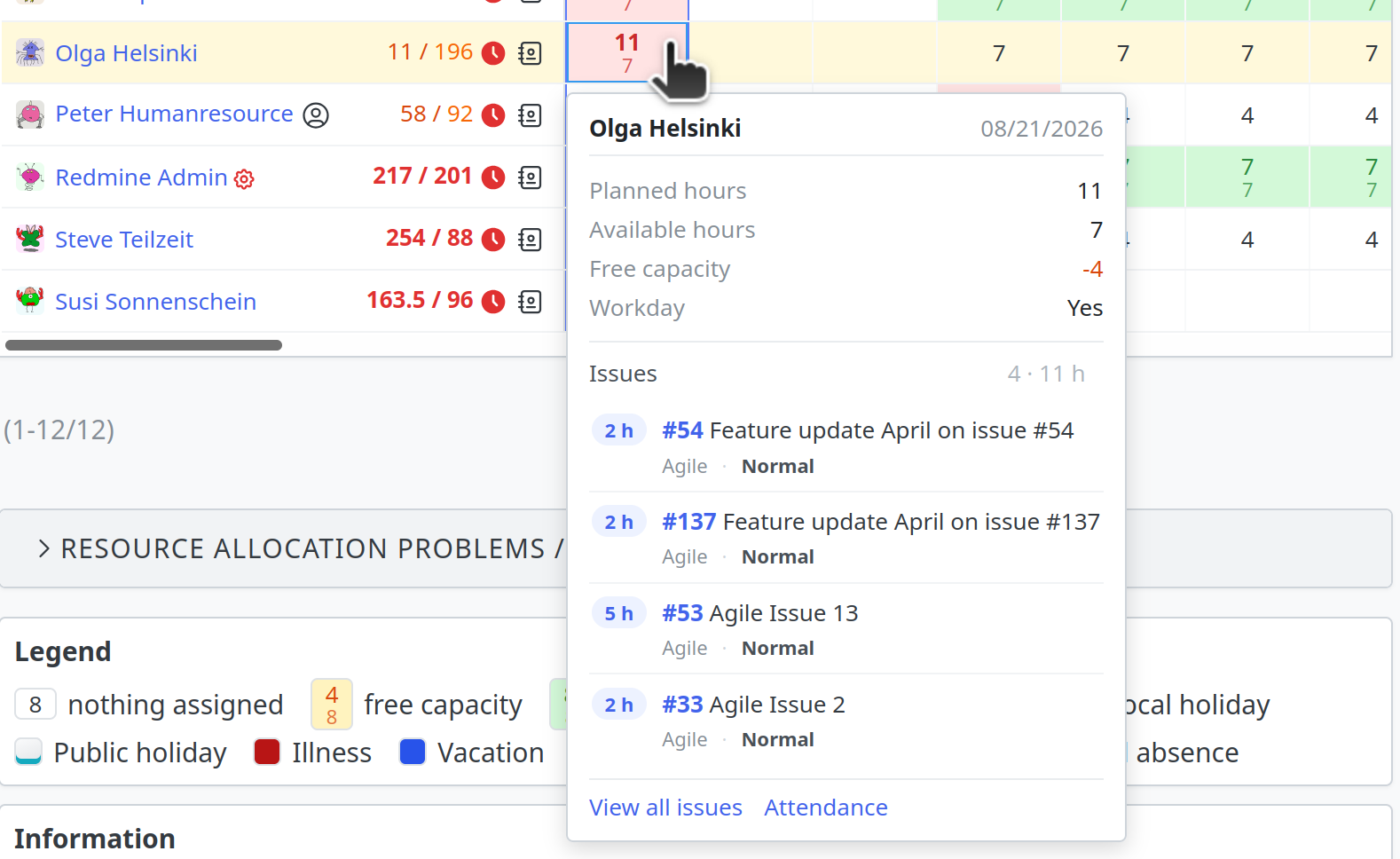 Click on a cell: card with hour figures and linked issues
- New: Resource view with toolbar, utilization as a key figure, resizable name column and click card with linked issues.
- New: The attendance list has the columns “% availability” and “% daily target” and a key figure card above the list. The filter “daily target exceeded” finds days with too much booked time.
- New: Task board cards mark the assignee when they are absent today. The tooltip names the type of absence.
- New: The account menu links to your own HRM pages (attendance, calendar, resources, performance).
- Improvement: One user list under
/userswith all HRM functions (columns, filters, grouping, export, saved queries). Saved queries from both previous lists are kept. Action required: The address/hrm/usersis removed, also in the REST API. Update bookmarks and integrations to/users. - Bug fix: Regional public holidays only apply to the affected users. Previously, a public holiday in Bavaria also applied to users in Hesse.
- Bug fix: Absences as a time span and bookings not yet approved count consistently in the “absent today” filter, in columns and on task board cards.
- Security: The bulk actions of the user administration (lock, unlock, delete) again require the appropriate permission. The “Group” filter of the user list treats input as values only.
Redmine Passwords
- Improvement: You select the icon of a password category with the icon picker.
- Bug fix: Changed plugin settings take effect immediately.
- Bug fix: When merging two contacts, the links to passwords are kept.
Redmine Reporting
The cards of the task board have a new design. They show the details as chips and icons instead of “field: value” lines. Fields without a value are omitted. The card color can be set by priority. You edit the subject directly on the card. New is a toolbar above the board with filter, target version, full screen and “collapse all”.
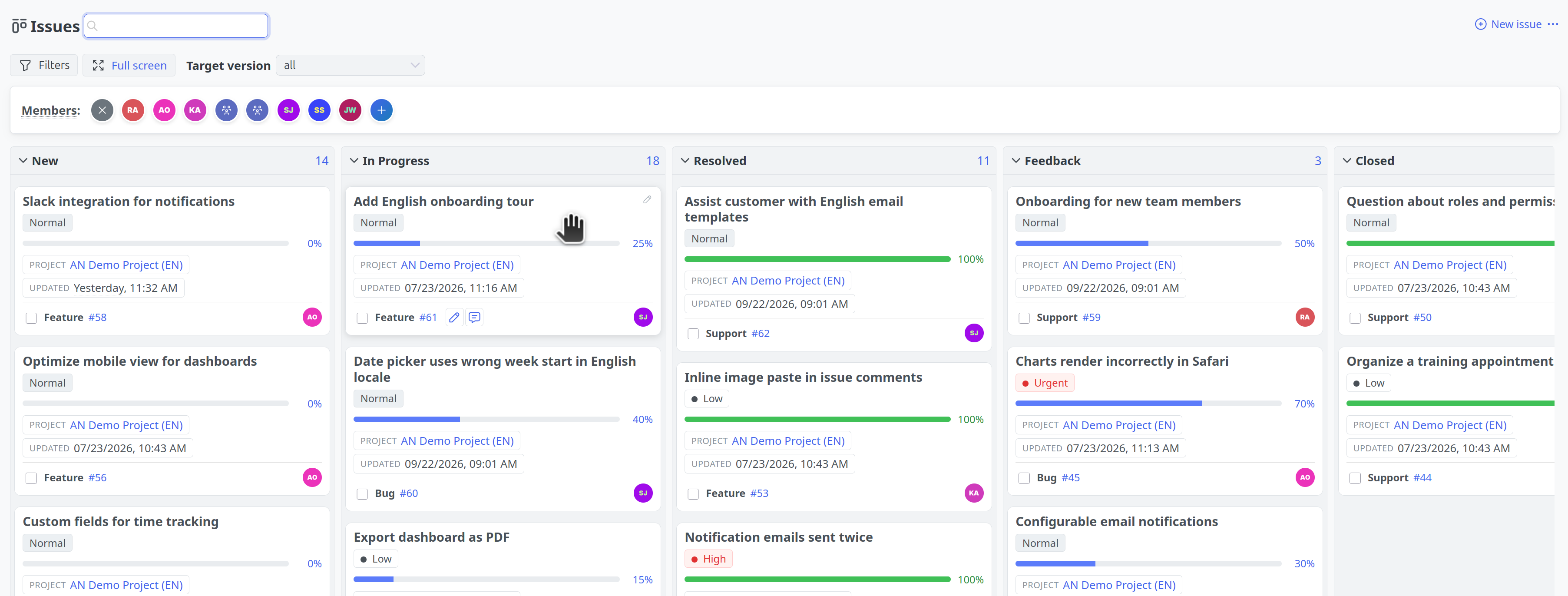 Task board with toolbar and new cards: priority as chip, progress bar, pencil icon for the subject
- New: Task board cards with chips and icons, card color by priority, subject editable on the card, “Description” and “Last note” as card fields.
- New: Toolbar above the task board (enabled in the plugin settings).
- New: Default page per project. When opening a project, another page appears instead of the overview, set globally and overridable per project.
- New: The “Target version” filter has the entry “Default version”. A saved view thus automatically shows the current default version of the project.
- New: The version list is readable via the REST API, with filters, sorting and saved queries.
- Improvement: The “Project planning” dashboard block shows budget consumption and elapsed duration as two bars on one percent scale instead of a ring chart.
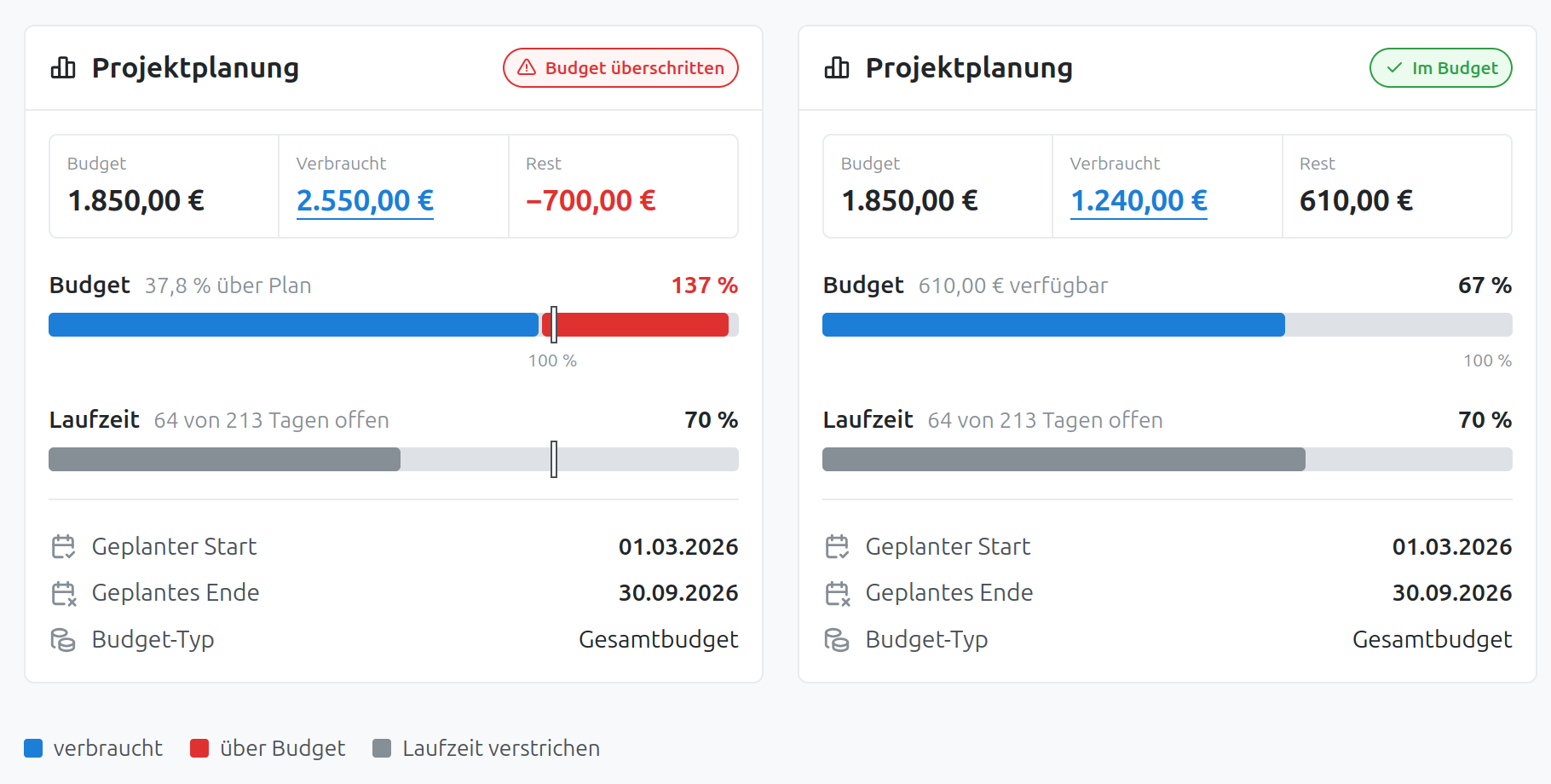 “Project planning” dashboard block with bars for budget consumption and duration
- Improvement: Three different icons for the SLA state, distinguishable even with red-green color blindness.
- Improvement: The system log in the database no longer records debug messages. This speeds up every page.
- Bug fix: The issue list of a project shows all issues, even if a user has several roles with different issue visibility there.
- Bug fix: Swimlanes on the task board follow the order of the groups in the issue list.
Redmine ServiceDesk
The e-invoice is extended. For items without tax, you store the tax category with a reason, in the project as the default and on the contact for individual customers (for example reverse charge in other EU countries). The e-invoice contains the customer’s VAT ID. Without it, validation tools reject such invoices.
- New: Tax category with reason for tax-free items, customer’s VAT ID in the e-invoice.
- New: Multilingual invoice email templates. You maintain subject and text per invoice language, for manual and recurring sending.
- New: Descriptions of custom fields appear on the contact as a tooltip, as with issue fields.
- Improvement: Contact list, contact card and duplicate search are readable on narrow screens without horizontal scrolling.
- Improvement: When merging two contacts, the selection list shows number and primary email. This distinguishes duplicates with the same name.
- Bug fix: Replies from a helpdesk issue are no longer reported as failed when the mail server takes longer to accept them.
- Security: The helpdesk form only accepts a return URL for hosts from the project settings. The REST API for invoice payments checks the permission when reading and deleting.
Redmine WikiGuide
- New: Wiki page format for custom fields. A record refers to a wiki page, selectable via autocomplete. The value appears as a link and can be filtered, sorted and exported. A setting allows links across projects.
- New: Three individually switchable blocks in the sidebar of the project wiki: navigation with page tree, current section and recently updated.
- New: Field values of a wiki page optionally appear in the sidebar and in the PDF export. The
wiki_custom_fieldsmacro outputs them at any position in the page content. - New: Filter and grouping by parent page in the wiki page list, also with “in subtree of”.
- Improvement: New global wiki overview with tag tiles and compact ratings.
- Bug fix: The REST API of the wiki page list outputs confidential attributes and tags only with the appropriate permission.
Redmine Templates
- New: Templates for bulk emails to contacts (with ServiceDesk plugin), with their own variable set and attachments.
- New: The template lists show the counter box with saved views (with Reporting plugin).
- Improvement: Added and removed file attachments are recorded in the template history.
- Bug fix: Error messages when saving a template appear above the form again.
Redmine Timesheet
- Bug fix: The stopped timer appears next to the user avatar in the top bar instead of in the Redmine 7 user menu.
Except for Issue Checklists, the products mentioned above are all part of the Enterprise+ Bundle.
Conclusion
Version 4.6.0 contains changes in all our plugins. The most important new features: task board cards in the Reporting plugin, resource view and single user list in the HRM plugin, e-invoice in the ServiceDesk plugin and the “Wiki page” field format in the WikiGuide plugin. In addition, the new Issue Checklists plugin, the “Number of files” column in all lists, new icons and smaller fixes.
Please note: version 4.6.0 requires Redmine 7. Redmine 6.1x is no longer supported. If you still run Redmine 6.1, update Redmine first and the plugins afterwards. What changes in Redmine 7 is described in our post on Redmine 7.0.0.
Professional Redmine Update
Customers whose Redmine we manage, or who use a Redmine Hosting package with us, do not need to worry about updating to the latest plugin version. We take care of that.
All information about our extensions for Redmine can be found on the product page. The plugins are available individually or as a bundle. Use is only possible according to our minimum requirements. Alternatively, you can book our Managed Application Hosting for Redmine. In our freely accessible online demo, you can test the functionalities of the current Redmine version together with our plugins. For questions that our product pages, FAQs, or online trainings do not answer, we are happy to help. Send us a message.