
Agile teams work in sprints, in fixed time frames of usually one or two weeks in which the team works towards a clear goal. In Redmine you map such sprints with versions. The Taskboard of the Reporting Plugin turns them into an interactive planning board.
In this article you learn how scrum masters, teams and management use the Reporting Plugin for their sprint and version planning.
Sprint = version: Redmine can already do this
The Reporting Plugin does not introduce a separate sprint entity of its own. It uses the Redmine versions as sprints and extends them with the necessary end date.
Redmine versions bring along everything a sprint needs:
- Start and end date: here you store the time frame of your iteration
- Sharing across projects: several projects can use the same sprint
- Automatic integration: versions feed the burndown chart, the roadmap and the progress display without additional effort
So you do not have to learn a second concept and do not have to maintain a parallel data structure. A “backlog” is simply a status of its own, or a version in which you collect unplanned issues. A “sprint” is a version with the time frame you define. The Reporting Plugin adds exactly the tools you are missing in the Redmine standard: the visual planning board and the graphical evaluation (burndown chart).
For scrum masters and project managers: sprint planning via drag & drop
The situation: Sprint planning meeting. In front of you are 60 issues in the backlog, and within the next 45 minutes they are supposed to become a full sprint. In the classic issue list this would mean: open every issue, set the target version, save, back to the list. With 20 issues to plan, the meeting is over before the planning is finished.
The solution: You open the Taskboard of the Reporting Plugin and group it by version. Now you see your versions as swimlanes, as separate horizontal rows: the backlog, the current and the next sprint. If you drag an issue from the backlog into the sprint version, this single action does both:
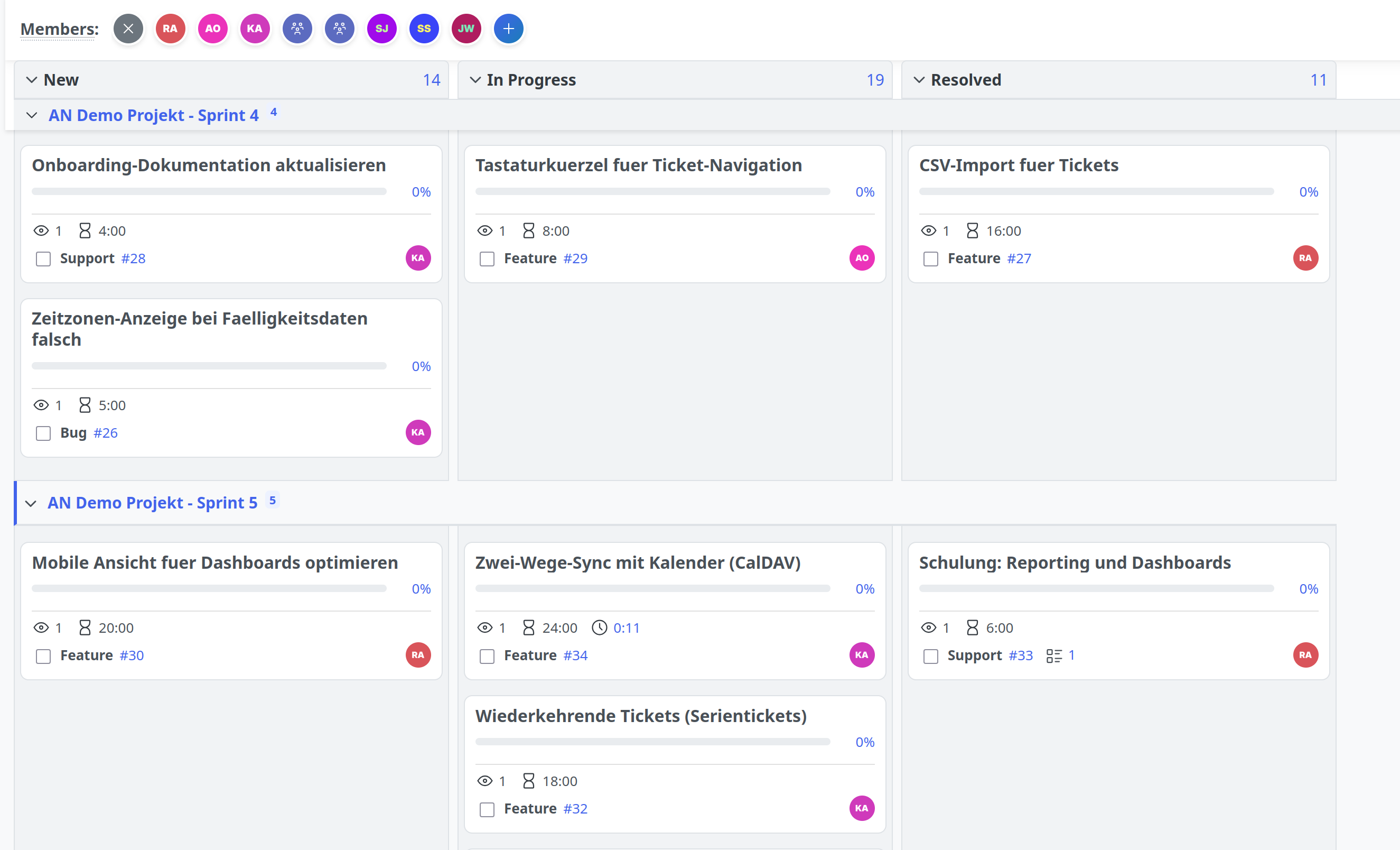
- It sets the target version, the issue now belongs to the sprint
- It changes the status, for example from “Backlog” to “Ready for sprint”, if you change the status column at the same time
Tip: Hold the Shift key while dragging and a comment field opens. There you record why an issue goes into this sprint. The board also respects all workflow rules and permissions. A transition that is not allowed jumps back and displays a message.
The result: The team sees in real time how the sprint fills up. For entire packages of issues you additionally use the bulk edit actions (select the relevant issues, right click, Redmine bulk edit) and assign the desired version to several issues at once.
For teams: working through the sprint
The situation: The sprint is running. In the daily scrum the team members ask themselves their usual questions: What did I do yesterday? What is on the agenda today? Is there a problem? And who has capacity for the next issue? A long issue list answers none of these questions quickly.
The solution: You filter the board on the current sprint version and group by assignee. Now every team member has their own row across all status columns:
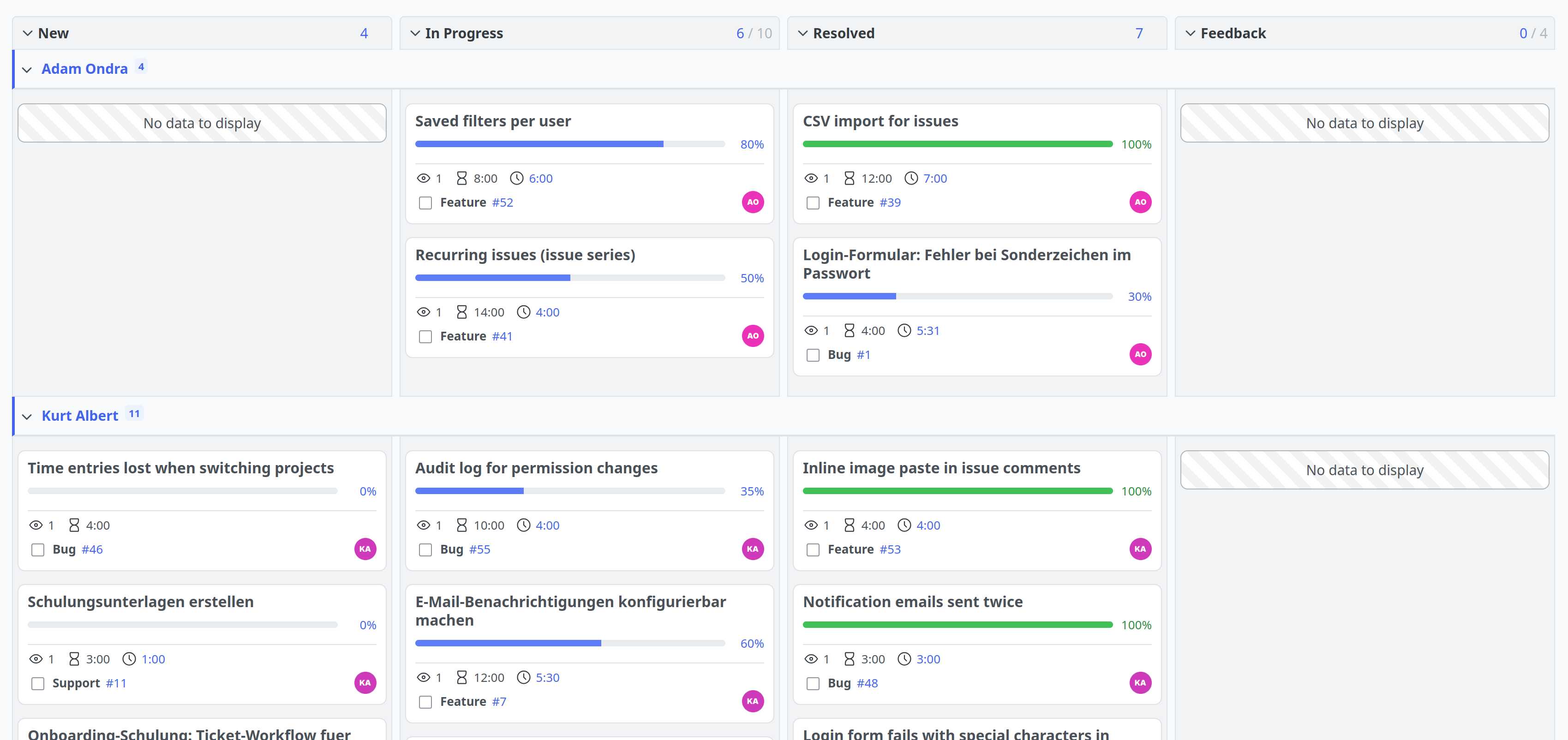
- Workload distribution at a glance: You see right away who has 6 issues in “In Progress” and who has none. Time to redistribute.
- Assignment in seconds: Using the avatar bar you drag a colleague directly onto an unassigned issue, without opening it and without a dropdown. The system remembers frequently used people automatically.
- Making bottlenecks visible: If issues pile up in “Review” while “In Progress” runs empty, you have a process problem in the sprint. And you have it now, not at the end of the sprint.
On top of that you colour the cards, for example by tracker. Then you recognise bugs and features by their colour:
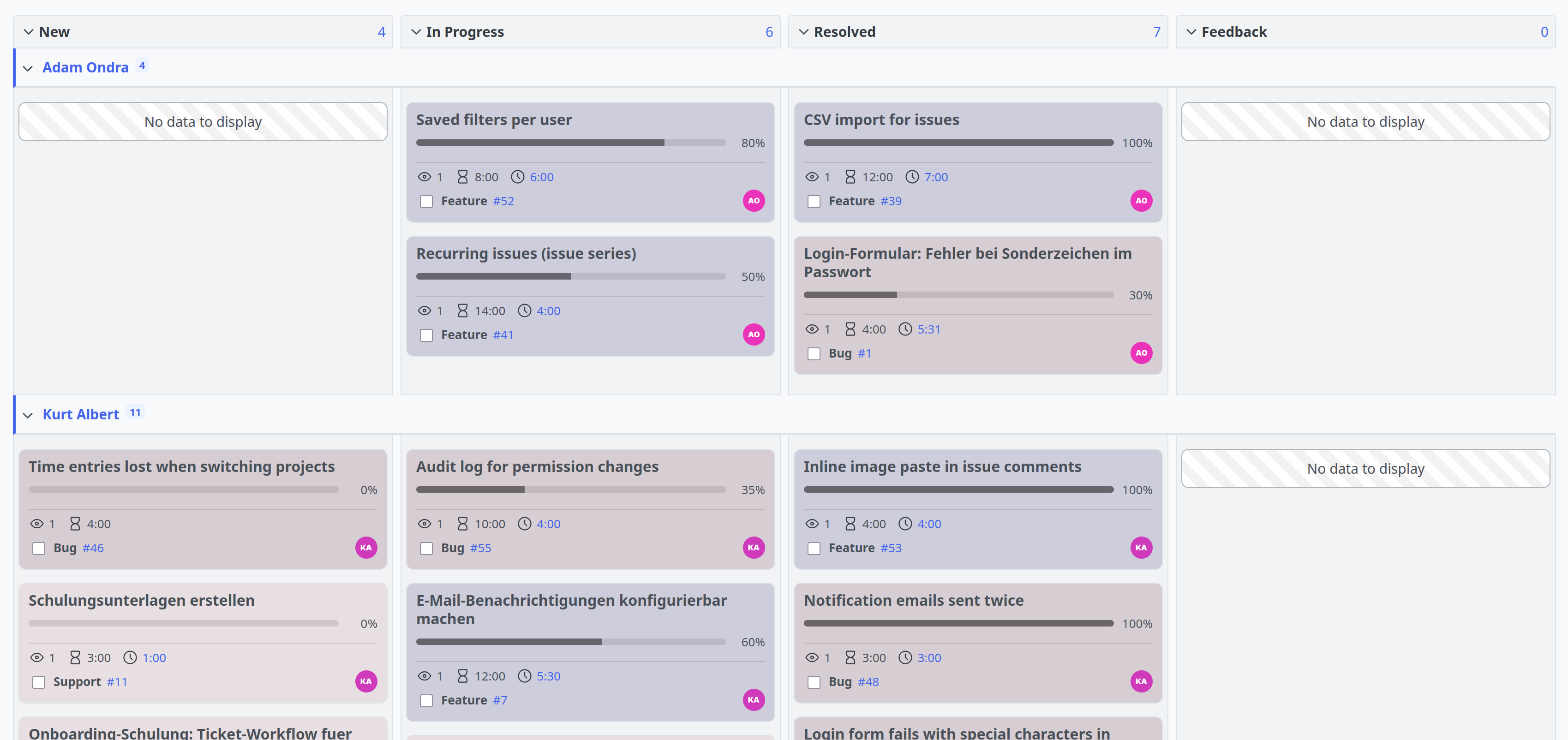
If your team prefers plain Kanban without fixed sprints, you keep using the same board without version grouping, with a WIP limit if you want.
The result: Everyone maintains their own status via drag & drop and the discussion in the daily is about real blockers.
For management and admins: progress and portfolio
The situation: You are responsible for several parallel teams and releases. Management wants to know: Will we manage the sprint? Where do releases overlap? And is a team falling behind its goal before it is too late?
The solution: Because your sprints are real Redmine versions, you can use them directly for the graphical evaluations of the Reporting Plugin.
Burndown chart for the individual sprint:
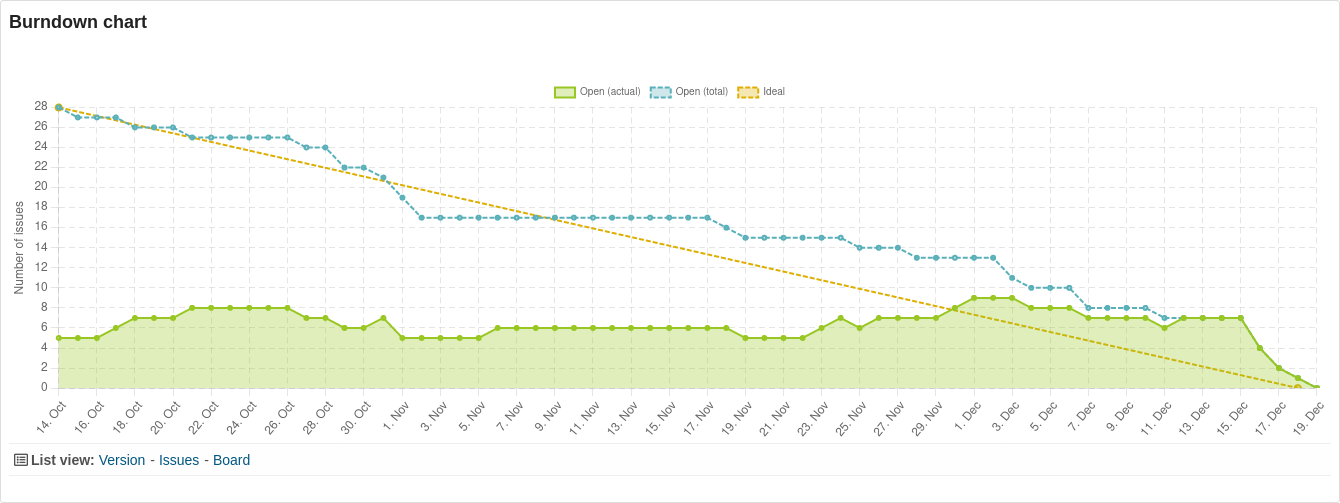
The burndown chart shows three lines for every version: the theoretical ideal line, the issues (or hours) actually open and all issues including newly added ones. If the actual line lies above the ideal line, the team is falling behind. You see that early enough to shift resources or adjust the scope. The chart is most practical as a dashboard block directly on the project overview.
Roadmap for the portfolio:
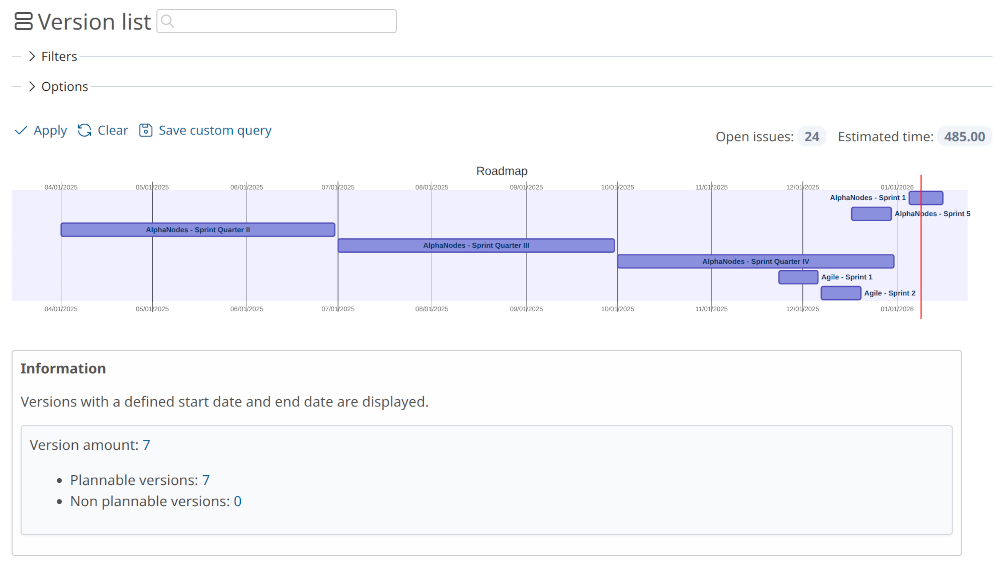
The roadmap view presents your versions on a time-based axis. Via the version list you immediately recognise how sprints and releases are distributed across the teams and where critical phases coincide.
Sharing sprints across teams: Because sprints are based on versions, you can share them via the standard sharing options: with subprojects, the project hierarchy, the project tree or all projects. Several teams thus plan the same release together, and the cross-project Taskboard view bundles all issues involved in one place.
The result: You show management concrete developments instead of estimates: “Sprint 14 in team A has been above the ideal line since day 4, we are counteracting here. Team B is on schedule.”
The saved query
Whether sprint planning, daily team work or progress monitoring: The actual strength lies in the custom queries Redmine provides. You set up a board view once and save filters, grouping, column selection and colour scheme as part of the query. After that it is available to you and your team with one click. You always have the usual issue filters and columns to choose from.
The following have proven themselves, for example:
- “Sprint planning”: board grouped by version, for the planning meeting
- “Our sprint”: board filtered on the active version, grouped by users, for the daily scrum meeting
- “Release progress”: burndown block on the project dashboard, for the management view
How to set up your sprint planning
- Create versions: Under Project settings / Versions create your sprints with a start and end date. Alternatively, a version without a date can serve as a backlog.
- Open the board: Go to the Issues area, open the Options and select the option Board under Display results as.
- Group by target version: Under Group results by select Target version. Now you can drag issues between the backlog and the sprints.
- Save the view: Save the configuration as a custom query, optionally shared with your team.
- Activate progress tracking: An administrator activates the burndown chart under Plugins / Redmine Reporting / General (option Display burndown chart for versions).
Requirements: Maintaining your data pays off. Burndown and roadmap only work with properly maintained start and end dates. The issues themselves do not need a date, they take it from the assigned version. So you only change the version assignment and the dates in the issue adjust themselves.
Conclusion
With the Reporting Taskboard, planning, daily work and progress monitoring run in one place, without new methodology and without switching tools. After all, the board view is simply a different representation of the issue list.
It does not replace a dedicated scrum tool by 100%. If your team absolutely needs one of the following things, the current range of functions is not sufficient:
- Backlog prioritisation via drag & drop: On the board, filters and sorting determine the order. A manual ranking is only possible via a position field, which is planned as an extension.
- Separate sprint and release levels: An issue belongs to exactly one version, so either to a sprint or to a release, not to both at the same time.
- Story points and velocity: Estimation points can be mapped as a custom field, but there is no native velocity chart.
For everyone else the range of functions is enough in daily work, above all if you do not work strictly agile and have Redmine Reporting installed anyway.
All information about our extensions for Redmine can be found on the product page. The Reporting Plugin is subject to a fee and is available separately or as part of our Business-Class Bundle as well as the Enterprise+ Bundle. The function described here can be tested extensively in our online demo.