
Redmine, the open source project management tool, does a lot out of the box: issues, wiki, time tracking, Gantt, roles and permissions, workflows and more. Still, many teams run into gaps. There is no board view for issues by default, the Gantt chart is read-only and shows nothing useful without maintained dates. And nowhere does it say who is available for which project.
The official plugin directory on Redmine.org now lists more than a thousand extensions (plugins). Many of them are well established, but many others have not been updated for years or are no longer maintained. In this post you will learn what to look out for when you need additional functions, and which of our plugins provides useful functions for different project teams.
Which need, which plugin?
| Need | Plugin | Why it helps | Available to buy | Redmine Hosting |
|---|---|---|---|---|
| Kanban and sprints | Reporting | Taskboard with drag and drop, swimlanes (one row per group, e.g. per person), WIP limits and burndown charts | ✓ | Core Stack |
| Subtasks inside the issue | Issue Checklists | Checklists with progress bar, templates and close protection | ✓ | Planning Add-On |
| Capacity and absence | HRM | Resource planning across all projects, leave and absences with approval | ✓ | Core Stack |
| Time tracking | Timesheet | Weekly timesheet and timer on the issue | ✓ | Planning Add-On |
| Overview and key figures | Reporting | Dashboards, extended project list, budgets, reports and charts | ✓ | Core Stack |
| Scheduling | Gantt | Change dates and dependencies directly in the chart | no | Planning Add-On |
| Support by email | ServiceDesk | Emails as issues, replies from Redmine, SLA via the Reporting Plugin | Enterprise+ only | Core Stack |
| Customers and contacts | ServiceDesk | Contact and company management, linked to issues | Enterprise+ only | Core Stack |
| Documentation and ISO evidence | Wiki Guide | Approval workflow and read confirmation for wiki pages, e.g. for ISO 9001 | ✓ | Core Stack |
| Order with many issues | Reporting | Tags for projects and issues, filterable and groupable | ✓ | Core Stack |
| Recurring tasks | Automation | If-then rules and recurring issues without programming | ✓ | Core Stack |
| Consistent issues and projects | Templates | Templates for projects, issues, comments and wiki pages | ✓ | Planning Add-On |
| AI in issues and wiki | AI | Summaries, finding similar issues, predefined prompts | no | AI Add-On |
| Login with company account | SAML / SSO | Single sign-on, e.g. with Microsoft Entra ID, Okta or Keycloak | no | SAML / SSO Add-On |
| Virus protection for attachments | ClamAV | Scans every uploaded file and removes infected files | no | ClamAV Add-On |
Buy: available individually or in a bundle. Core Stack: included in Redmine Hosting. Add-On: can be added to Redmine Hosting for a monthly fee.
There are also plugins for more specific tasks: DB for assets and inventory, Passwords for credentials within a project and DevOps for connecting GitLab, GitHub, Zabbix and other services.
When the issue list is no longer enough
Redmine shows issues as a list. There is no board view with columns per status. Kanban needs exactly these columns, plus WIP limits: an upper limit for issues in progress per column. If you plan in sprints, you also need a burndown chart.
The taskboard in the Reporting Plugin turns the issue list into a board. You drag issues to the next status. WIP limits and burndown charts are included, and the board also works across projects. The posts on WIP limits and sprint and version planning show how this works in practice.
When the same steps come up every time
Onboarding, release, quality check: the steps are the same every time. A separate subtask for each step is too much. A list in the description quickly gets messy.
Issue Checklists adds a checklist directly to the issue. With the Templates Plugin, an issue template brings its checklist along. Both are available together as a bundle. If needed, the Automation Plugin also creates such issues on a regular schedule. Details are in the post on the checklists plugin.
When nobody knows who has time next week
Redmine knows who an issue is assigned to. It does not know whether that person is on leave next week or already working on three other projects.
The HRM Plugin manages absences and calculates the available time per person from them. Resource planning shows how busy each person is, across all projects. To be clear about its scope: HRM is not a payroll system and not a time clock. More on this in the post Employee time tracking and absence management.
When time is logged on Friday afternoon
Redmine’s time entry form records one entry per issue and day. If you log the whole week on Friday, you click through a lot of forms.
The Timesheet Plugin shows a weekly grid: issues on the left, days at the top, hours in the cells. If you prefer to log in real time, you start the timer on the issue. Both end up in the normal Redmine time entries, so reports and exports keep working as before.
When customer requests come in by email
The ServiceDesk Plugin fetches emails from a mailbox and creates issues from them. The sender is saved as a contact, and replies go from the issue back to the customer. With the SLA management from the Reporting Plugin you can see whether response and resolution times are met. Microsoft 365 mailboxes are supported via OAuth.
ServiceDesk is only available in the Enterprise+ Bundle. It requires Reporting and Automation.
Where to start, depending on your team
Software team using Kanban or Scrum Reporting for taskboard and burndown, Issue Checklists for definition of done and release processes, Timesheet for time tracking. If you use GitLab or GitHub, add DevOps (available together with Reporting as the DevOps Bundle).
Agency or service provider Reporting for budgets, hourly rates and project list, Timesheet for time tracking, ServiceDesk for customer support. Since ServiceDesk is only included in the Enterprise+ Bundle, the full bundle is usually the better choice here.
PMO or many parallel projects Reporting for dashboards, the cross-project board and the project list, HRM for resource planning. HRM is available together with Reporting as the Business-Class Bundle. If your dates keep moving, add the Gantt Plugin.
Internal processes and ISO certification If you have to provide evidence under ISO 9001 or another standard, you must show that documents are approved and known to your staff. Wiki Guide provides an approval workflow for wiki pages and read confirmations that show who has read which document. Templates and Issue Checklists capture fixed processes, Automation takes care of recurring tasks.
What to check before installing
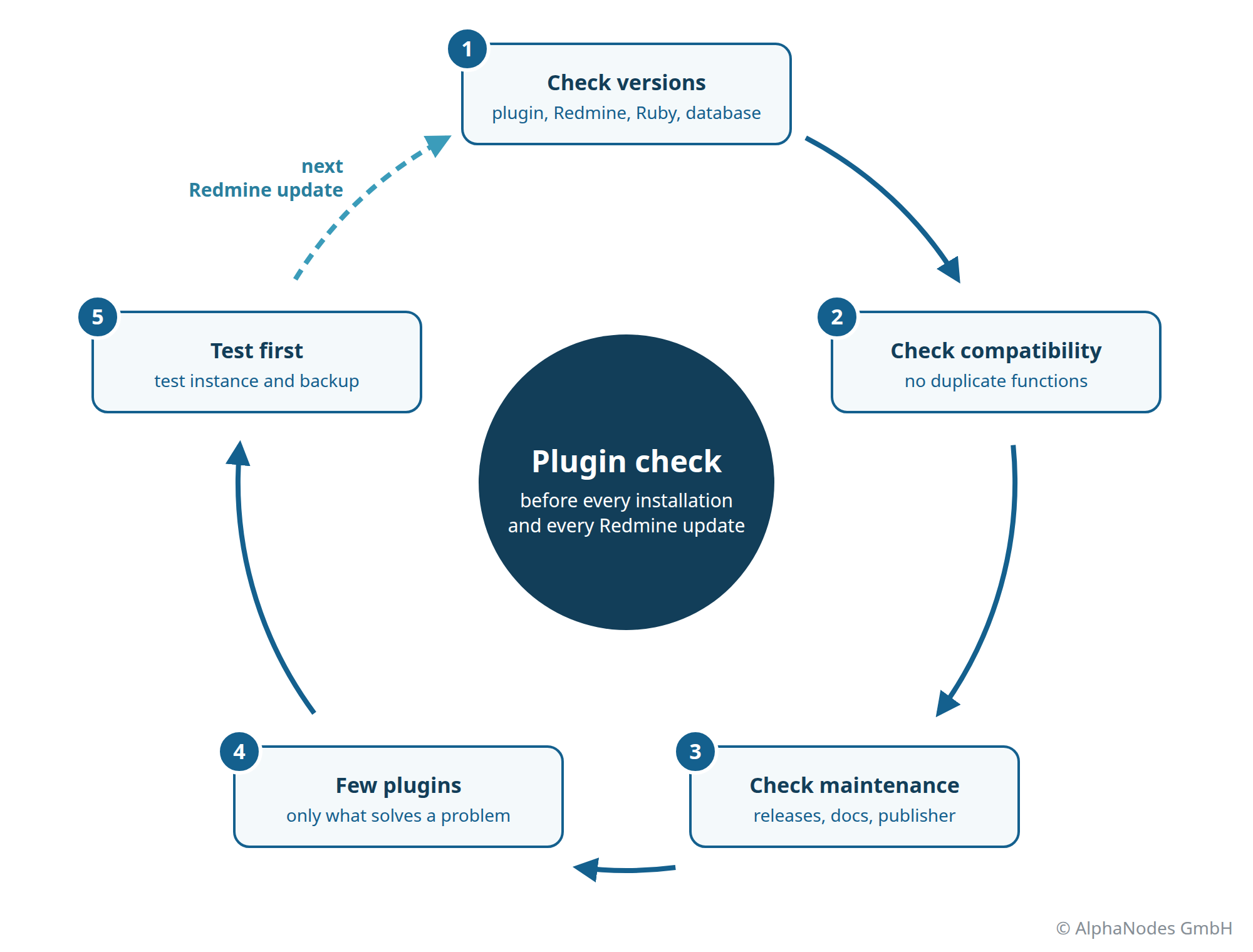
Versions have to match
Plugin, Redmine version, Ruby version and database have to fit together. A plugin written for Redmine 5 often no longer runs on Redmine 7. Our current plugin version v4.6.0 requires Redmine 7. The full minimum requirements are on the pricing page.
Plugins have to work with each other
Two plugins that bring the same function get in each other’s way. Typical cases are tags, budgets, SLA, staff management and plugins that replace the Redmine editor. Which plugins conflict with ours is listed in the licence FAQ.
We develop and test our plugins together. They are released with the same version number and are designed to work together.
Check the maintenance
When was the last release? Is there documentation? Are there notes on migrating to the next Redmine version? An unmaintained plugin will block the next Redmine update sooner or later. We publish our changes with every release in the blog or in the news section.
Start small
Do not install twenty plugins at once. Start with a few that solve a specific problem. Every plugin has to be carried along with every Redmine update, and every new plugin changes the way your team works.
Test first, then install
New plugins and updates belong in a test instance first. This applies in particular to plugins that create their own tables in the database. Make a backup beforehand and check that it can actually be restored.
When data protection and security matter
A plugin becomes part of Redmine and therefore has access to all data: issues, users, attachments. Roles and permissions only protect you if the plugin respects them. So before installing, clarify a few questions:
- Who is behind the plugin? Plugins that were built quickly and then no longer maintained have always existed. With AI tools (vibe coding) there are more of them, and from the outside they look just as tidy as maintained plugins. Who publishes them is often unknown. Whether that person has software development experience and can build a secure plugin cannot be verified.
- Can you inspect the source code? Our plugins are licensed under the GPL v2, and you receive the complete code.
- Are security issues fixed? Security updates are included for our plugins during the licence term.
- Does data leave your system? This mainly concerns AI plugins. In AI Hosting the AI runs on a server in the EU or on your own server, and data is not sent to external AI providers.
- Does the plugin respect permissions? Our plugins come with their own permissions that you assign per role. The plugins respect them. A few examples:
- Budgets and hourly rates in Reporting are only visible to users with the View budget permission.
- For checklists, ticking off items can be separated from editing. A team member can complete items without restructuring the list.
- Private DB entries are only visible to the author, the assigned users and groups, administrators and users with the Show private DB entries permission.
- Passwords are only visible to the project members they are assigned to.
These plugins and add-ons help you protect data and provide evidence of compliance:
- Passwords: store credentials encrypted (AES 256) in Redmine. Visible only to the assigned project members, instead of sending them by email.
- SAML / SSO Add-On: log in with the company account. Anyone who leaves the company loses access to Redmine along with the company account.
- ClamAV Add-On: virus scan for every uploaded file.
- Wiki Guide: approvals and read confirmations as evidence.
Buy or hosting?
You buy our plugins once as a support licence for 12 months. During this time you receive updates and support. After that you can keep using the last version you downloaded, and renewal is optional. The number of users does not matter. There are bundles for common combinations, and the Enterprise+ Bundle contains ten plugins. You take care of installation and updates yourself.
In Managed Hosting we install the plugins and keep them compatible with Redmine updates. Security updates and daily encrypted backups are included. With the cloud option the data stays in Germany, with InHouse on your own server. Reporting, Automation, DB, DevOps, HRM, Passwords, ServiceDesk and Wiki Guide are included in the Core Stack. You can add further functions as add-ons:
- Planning Add-On: Gantt, Issue Checklists, Templates and Timesheet. A comparison with standard Redmine is available at Planning Add-On comparison.
- AI Add-On: AI functions in issues and wiki. More at Redmine AI Hosting.
- SAML / SSO Add-On: log in with the company account, configured in the user interface.
- ClamAV Add-On: virus scan for all files uploaded to issues and wiki.
Add-ons are billed monthly. Prices are on the Redmine Hosting page.